> ## Documentation Index
> Fetch the complete documentation index at: https://www.marqeta.com/docs/llms.txt
> Use this file to discover all available pages before exploring further.
# Credit Products in the Marqeta Dashboard
> Use Credit Products in the Marqeta Dashboard to manage your credit products.
**Warning**\
This page is currently deprecated and the functionality it describes will soon be unavailable. To learn more, contact your Marqeta representative.
This feature has been replaced by credit product policies, which is part of the bundles feature. For more on policies and bundles in a credit program, see [Credit Programs in the Marqeta Dashboard](/developer-guides/credit-programs-dashboard/).
Use Credit Programs in the [Marqeta Dashboard](https://app.marqeta.com/) to manage your fintech credit products. Depending on your role, you can accomplish tasks such as:
* Create new and manage credit products.
* View all configured credit products and relevant information.
* View the credit product’s history of transitions, which is displayed as a log of comments left by the creator and approver to capture changes
The basics
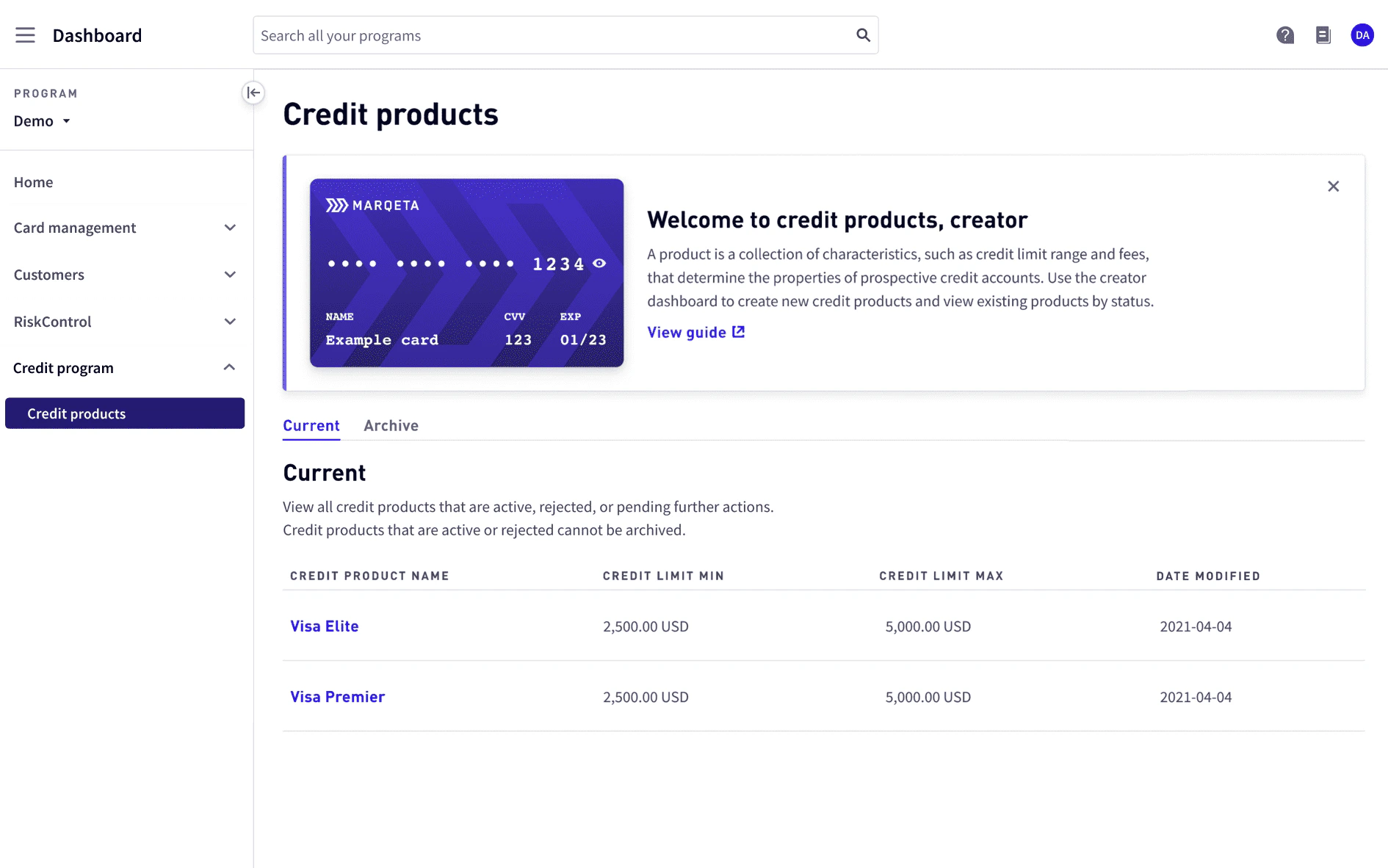
To manage credit programs, log into the [Marqeta Dashboard](https://app.marqeta.com/), select **Dashboard** in the upper-left corner, and then select **Credit products** from the sidebar. For more on accessing the Marqeta Dashboard, see [Access the Marqeta Dashboard](/developer-guides/dashboard-overview-and-quick-start/#_access_the_marqeta_dashboard).
How to…
* View a list of credit products
* View the details of a specific credit product
* Create a credit product (creators only)
* Edit a credit product (creators only)
* Approve, reject, or send a credit product back for revision (approvers only)
* Archive a credit product
* Restore an archived credit product
Admin-assigned roles
Marqeta Dashboard users with an admin role can assign roles to other users. For details on how to manage users, see [User management](/developer-guides/control-center-dashboard/#_user_profiles).
The following table shows the roles and permissions available for credit products.
| Roles | Description |
| ------------- | ---------------------------------------------------------------------------------------------------------------------------------------------------------------------------------------------------- |
| Creator | - Create a new credit product or save a draft.
- Edit a credit product in draft or sent for revision.
- View all pending, active, and rejected credit products. |
| Approver | - Approve, reject, or propose edits to a credit product by sending it for revision.
- View all active, pending, and rejected credit products.
- Archive credit products sent for revision. |
| Support agent | - View all active credit products. |
Approval queue
The following applies if your role is `creator` or `approver`.
**Approval queue** allows creators and approvers to view a list of credit products that are in review or revision.
Each line item displays:
* Credit product name.
* Credit product status. For more on statuses, see [Credit product statuses](#_credit_product_statuses) below.
* Date and time the credit product was submitted for review or revision.
To view a credit product, select its name from the list.
To revise a credit product as a creator, see [Editing a credit product](#_editing_a_credit_product).
To review a credit product as an approver, see [Approving, rejecting, or sending a credit product back for revision](#_approving_rejecting_or_sending_a_credit_product_back_for_revision).
Credit products
**Credit products** allow you to manage and explore credit products. A credit product is a collection of characteristics, such as the credit line range, fees, or interest, that determine the behaviors and attributes of its associated credit accounts.
Credit product statuses
A credit product can have one of the following statuses.
| Status | Role | Description |
| ---------------------------- | ---------------------------------------------------- | ---------------------------------------------------------------------------------------------------------------------------------------------------------- |
| Draft | Creator | The credit product is in draft and is not yet active. |
| Active | Creator
Approver
Support agent | The credit product is active. |
| Rejected | Creator
Approver | The credit product has been rejected and cannot be worked on. Its status cannot be changed. |
| Sent for review | Creator | As a creator, you have sent the credit product to the approver for review. |
| Needs your revision | Creator | As a creator, the approver has returned the credit product to you to revise. |
| Needs your review | Approver | As an approver, the creator has submitted the credit product to you for review. |
| Send for revision to creator | Approver | As an approver, you have sent the credit product back to the creator for revision. |
| Archived | Creator | The credit product has been archived and can be restored as a draft.
**NOTE:** Only creators can restore an archived credit product as a draft. |
Viewing a list of credit products
To view a list of all credit products, go to **Credit Programs > Credit products**. A welcome banner is displayed at the top. To hide the welcome banner, select **x** from the top-right corner.
You can view a list of current or archived credit products.
| Tab | Description |
| ----------- | ------------------------------------------------------------------------------------------------------------------------------------------------------------------------------------------------------------------------------------------------------------------------------------------------------------------------------------------ |
| **Current** | Displays credit products that are active, rejected, or pending further action.
Credit products are listed by name. Each line item displays:
- Credit product name.
- Status.
- Credit limit minimum and maximum.
- Date the credit product was last modified. |
| **Archive** | Displays archived credit products, which the creator can restore as drafts.
Credit products are listed by name. Each line item displays:
- Credit product name.
- Credit limit minimum and maximum.
- Date the credit product was archived. |
Viewing credit product details
To display the credit product details, select the credit product name from the list of credit products.
The credit product name is displayed at the top along with its status, token, and the date and time it was last modified. To view the credit product’s token history, select **Full token history**.
Credit product token history
The **Credit product token history** allows you to view a table of the credit product’s full token history. Each line item displays:
* Credit product token.
* Token status.
* **Active** – Token currently used by the credit product.
* **Inactive** – Token that was previously used by the credit product, but has since been replaced.
* Date and time the token was created.
Each time a credit product is updated, a new active token is created and assigned to the credit product; the previous active token becomes inactive.
Global configurations – Core constructs
| Field | Description |
| ----------------------------- | -------------------------------------------------------------------------------------------------------------------------------------- |
| Status | Status of the credit product. |
| Card product | Name of associated card products. |
| Credit product description | Description of the credit product. |
| Credit product classification | Classification of the credit product, either business or consumer. |
| Credit product type | Type of the credit product. |
| Credit product subtype | Payment card of the credit product. |
| Currency | Currency the credit product uses. |
| Credit limit range | Minimum and maximum amount that associated credit accounts can carry. |
| Billing cycle day | Day of the month a new billing cycle begins. |
| Payment due day | Day of the month the payment is due. |
| Usage | Type of balance for which a credit account can be used. |
| Payment allocation order | The order of account balances, either principal, interest, or fees, to which payments are allocated after the minimum payment is paid. |
Global configurations – Payments
| Field | Description |
| ------------------------------- | ---------------------------------------------------------------------------------------------------------------------------------------------------------------------------------------------------------------------------------------------- |
| Minimum payment percentage | Percentage of the statement balance that helps determine the minimum payment value.
If the amount of the **minimum payment percentage** is greater than the fixed **minimum payment amount**, it becomes the minimum payment value. |
| Minimum payment amount | Fixed amount that helps determine the minimum payment value.
If the **minimum payment amount** is greater than the amount of the **minimum payment percentage**, it becomes the minimum payment value. |
| Minimum payment applied towards | Type of account balance on which to apply the minimum payment. |
Usage configurations – Purchases
| Field | Description |
| ------- | ----------------------------------------------------------------------------------------------------------------------------------------------------------------------------------------------------------------------------------- |
| APR | Type of annual percentage rate (APR) on the credit product.
- **Go-to** — The regular rate that is applicable when the promotional rate period expires. |
| Fees | Types of fees applied on the credit product.
- **Late payment fee** — A fee for making a late payment.
- **Returned payment fee** — A fee for making a returned payment.
- **Periodic fee** — A recurring fee. |
| Rewards | Whether cash back rewards are enabled on the credit product. |
Usage configurations – Interest calculation
| Field | Description |
| ------------------------------ | ----------------------------------------------------------------------------------------------------------------------------------------------------------------------------------------------------------------------------------------------------------------------------------------------------- |
| Method | Method of calculating interest. |
| Day count | Day count convention used to calculate the daily periodic rate.
- **Actual** — Calculates the daily periodic rate using the actual number of days in the year. |
| Interest application | Types of balances to include in the daily balance calculation for interest, either principal, fees, or interest. |
| Minimum interest | Minimum amount of interest to charge if the calculated interest amount is below this value. |
| Interest on grace reactivation | How interest is charged on an account in an end revolving cycle.
- **Accrue till payment date** — Calculates interest until the payment due date.
- **Accrue full cycle** — Calculates interest for the entire billing period.
- **Waive** — Does not charge interest. |
| Grace days | How the grace days are applied; determines the last day of the grace period based on which interest charges are calculated.
- **Next cycle date** — If a payment is not made by the last day of the statement period, interest starts accruing on the first day of the next billing cycle. |
| Credits application | How credits are applied on an account, based on the account cycle, during a billing period. |
| Excluded transaction types | Transaction types that are excluded from the current billing period’s interest charge, but are included in the next billing period’s interest charge. |
Activity
The **Activity** log shows the history of activity on the credit product displayed as a log of comments left by the creator and approver to capture changes. Each comment includes the credit product status at the time of comment, the commenter’s email, the time the comment was left, and the comment itself.
The credit product workflow
The creator starts creating a new credit product.
The creator specifies global and usage configurations.
The creator reviews the credit product, adds a note, and submits it for approval.\
(Note: You can save a credit product as a draft instead of submitting for approval. Credit products in draft status do not appear in the **Activity** log.)
The approver adds a note and approves, rejects, or sends the credit product back to the creator for revision.
If sent for revision, the creator revises the credit product, adds a note, and resubmits it for approval.
If approved, the new credit product is active and can be used to create credit accounts.
Credit product tutorials
The following tutorials walk you through how to manage credit products based on your role.
| Creating a credit product (creators only)
Editing a credit product (creators only)
Approving, rejecting, or sending a credit product back for revision (approvers only)
Archiving a credit product
Restoring an archived credit product |
| -------------------------------------------------------------------------------------------------------------------------------------------------------------------------------------------------------------------------------------------------------------------------------------------------------------------------------------------------------------------------------------------------------------------------------------------------------------------------------------------------------------------------------------------------------- |
Creating a credit product
The following applies if your role is `creator`.
To create a credit product, select **Create credit product** from **Credit Programs > Credit products**.
The fields defined on **Create credit product** determine the attributes of its associated credit accounts.
**Note**\
Currently, some fields have default values that can be configured in the future.
Step one. Specify global configurations
Select card products to associate with the credit product. For more on card products, see [Managing Cards in the Marqeta Dashboard](/developer-guides/cards-dashboard/).
Enter a name and description for the credit product.
Review the credit product classification, type, subtype, and currency type.
Define the credit limit minimum and maximum amounts.
Review the billing cycle day, payment due day, and balance usage.
Define the minimum payment percentage and amount.
Select **Continue**.
Step two. Specify usage configurations
Select the fee types to apply to purchases when creating credit accounts based on this credit product.
If selecting a periodic fee:
* Select the frequency, monthly or annual, to apply the fee.
* Enter the number of days after the account activation date to charge the initial fee.
* If the frequency is monthly, the fee charge recurs on the same day each month. If the day is not applicable, such as day 31, the fee charge occurs on the last day of that month.
* If the frequency is annual, the fee charge recurs on the same date each year. If the date is not applicable, such as in a leap year, the fee charge occurs on the last day of the month in that year.
**Note**\
You can only set one monthly fee and one annual fee.
Review the APR, rewards, and interest calculation fields.
Select **Continue**.
Step three. Review and submit
Review all the fields for the credit product.
Enter a note to the approver that also appears in the **Activity** log.
Select **Submit** to send the credit product to the approver for review or **Save as draft** to save the credit product as a draft.
Editing a credit product
The following applies if your role is `creator`.
You can edit a credit product in one of the following statuses: active, draft, sent for revision.
* To edit an active credit product, select the credit product name from **Credit Programs > Credit products**, and then select **Update credit product** on the top-right of the page. The **Update credit product page** appears.
* To edit a credit product in draft, select the credit product name from **Credit Programs > Credit products**. The **Edit credit product draft** appears.
* To edit a credit product sent for revision, select the credit product name from **Credit Programs > Approval queue**. The **Revise credit product page** appears.
Step one. Update global configurations
Select, deselect, or enter new values for the fields to update. The following fields can be updated:
* Card product
* Credit product name
* Credit product description
* Card products
* Credit product classification
* Credit limit minimum and maximum
* Minimum payment percentage
* Minimum payment amount
Select **Continue**.
Step two. Update usage configurations
If your credit product is in draft, select or deselect fees and toggle rewards.
If your credit product is active or sent for revision, select and enter a new periodic fee.
You cannot edit or remove an existing fee.
Select **Continue**.
Step three. Review and submit
Review all the updated fields for the credit product.
Enter a note to the approver that also appears in the **Activity** log.
To submit the credit product to the approver for review, select **Submit**.
Approving, rejecting, or sending a credit product back for revision
The following applies if your role is `approver`.
To make a decision about a credit product pending approval, select the credit product from **Credit Programs > Approval queue**.
On **Review credit product**, you can view the creator’s comments in the **Activity** log at the bottom.
Review the fields for the credit product.
Enter a note to the creator that also appears in the **Activity** log.
To approve of the credit product, select **Approve**.
To send the credit product back for revision, select **Send back for revision**.
To reject the credit product, select the **More** dropdown, and then select **Reject**.
Archiving a credit product
**Note**\
You cannot archive an `active` credit product.
To archive a credit product that’s not active, select the credit product name from **Credit Programs > Credit products**.
In **Edit credit product**, you can view the **Activity** log at the bottom.
Step one. View global configurations
* Select **Continue**.
Step two. View usage configurations
* Select **Continue**.
Step three. View review and submit
Enter a note to appear in the **Activity** log.
To archive the credit product, select **Archive**. The credit product now appears in the **Archive** tab.
Restoring an archived credit product
To restore an archived credit product, select the credit product name on the **Archive** tab from **Credit Programs > Credit products**.
Scroll to the bottom and enter a **Note** to appear in the **Activity** log.
Select **Restore as draft**. **Edit credit product** is displayed.
Continue the steps for [Editing a credit product](#_editing_a_credit_product).