

To take advantage of any of these reports, contact your Marqeta representative.
Bank Files
Data Products and Insights provides Bank Files, which are records of all activity and incremental adjustments that have occurred for transactions, accounts, and cards. Bank Files are sent to partners and customers daily, and the transfer methods used to download Bank Files are PCI-compliant.Accessing Bank Files
To access Bank Files:1
Go to the Marqeta Dashboard.
2
Select Data & Insights in the upper-left corner.
3
Select Reports in the sidebar.
4
Select Insights - Bank Files.
Use cases
This report provides banks with program details to facilitate money movement and monitor activity and cardholder demographics in order to comply with BSA/AML and KYC/KYB regulations.Download bank files
To do this in the Marqeta Dashboard:1
Select Data & Insights in the upper-left corner, then select Reports in the sidebar.
2
From the dropdown list at the top, select Insights - Bank Files.
3
Select Customize Report and ensure that you have no filters selected.
4
Select the report you would like to run.
5
Select the date range.
6
Select Download Current Report at the top right. The system prompts you with an option to either download it as a
.csv or .csv.gz file.cURL
Authorization and Clearing Comparison Detail
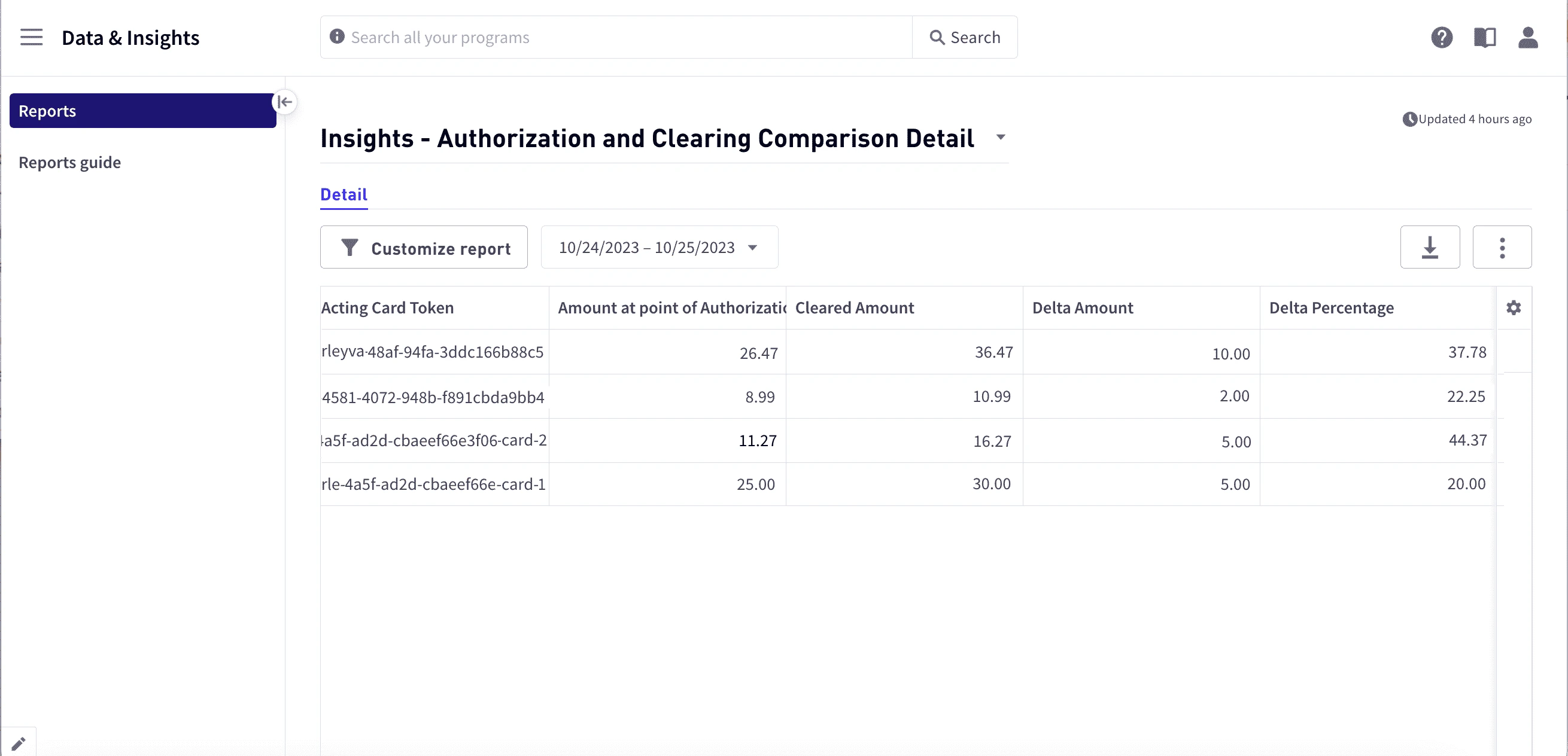
The Authorization and Clearing Comparison Detail report links authorizations to clearing details. This report significantly reduces the time required to identify the clearing differences per transaction. The Authorization and Clearing Comparison report provides insights into all cleared Signature transactions comparing the initial authorized amount vs the amount cleared. The primary use case of this report is to identify fraudulent transactions where merchants or cardholders increase the amount to be cleared outside of the cardholder’s consent (for example, tips) or the cost of the goods.Accessing the report
1
Go to the Marqeta Dashboard.
2
Select Data & Insights in the upper-left corner.
3
Select Reports in the sidebar.
4
Select Insights - Authorizations and Clearing Comparison Detail.
Use cases
This report has multiple use cases to reduce operational time to derive information and socialize fraud activity. Described are some typical use cases.- Identify daily early signs of bad merchant behavior and stop suspected fraud by updating velocity controls and declining transactions at that merchant.
- Detect and investigate suspected fraudulent merchants or cardholders early on.
- Review behavior of card products that may regularly add on to the authorized amount in the form of tips or increased price of goods.
How to use the Authorizations and Clearing Comparison Detail report
To identify anomalies or large deltas between authorizations and clearing amounts, review the Amount at point of Authorization, Cleared Amount, Delta Amount, and Delta percentage fields. Use the following steps to create and save a report that includes this information:1
Select Customize report.
2
Under Filter:
- Select Delta Percentage > and enter the value
20. - Select Network Type, select =, and then enter
Signature.
3
Under Sort, select Delta Percentage and then select DESC
4
In the Date Range Selector, choose your desired date range (Last 7 Days recommended).
5
Select the Three Vertical Dots button in the upper-right corner and then select Save current report.
DiVA API
To generate this report using the DiVA API, send a request to thehttps://diva-api.marqeta.com/data/v2/views/authorizationclearing/detail endpoint as in the following example:
cURL
JSON
Quarterly Network Reports
Quarterly Network Reports (QNRs) are regulatory reports administered by Visa and Mastercard. Marqeta’s QNRs provide programs with access to quarterly reporting for both Visa and Mastercard, with all current requirements set forth by the card networks. The networks require that banks report card program metrics by the 15th day of the first month of every quarter. Marqeta commits to delivering QNRs to enrolled programs by the 10th day of the first month of every quarter. These reports contain data elements related to card and account activity as they apply to the card programs. This data includes, but is not limited to, total number of cards active in the cycle, transactional volumes, number of digital or tokenized cards, and total accounts open. Networks regularly update the data required in each report, and it is the responsibility of the program manager to monitor these changes and supply accurate data based on current requirements with the networks.Accessing the Quarterly Network Report
To access the Quarterly Network Report:1
Go to the Marqeta Dashboard.
2
Select Data & Insights in the upper-left corner.
3
Select Reports in the sidebar.
4
Select Insights - Quarterly Network Reports.
Use cases
This report provides accurate and easy access to data, as required by the card network and banking entities.Downloading the Quarterly Network Report
To do this in the Marqeta Dashboard:1
Select Data & Insights in the upper-left corner.
2
Select Reports in the sidebar.
3
Select Insights - Quarterly Network Reports.
4
Select Customize Report and ensure that you have no filters selected.
5
Select your desired date range.
6
Select Download Current Report at the top right. The system prompts you with an option to either download it as a
.csv or .csv.gz file.cURL
.csv file.
cURL
.csv file:
cURL
gunzip insights_quarterly-network-reports-visa_visa.csv.gz. You can then view the file:
cURL
.csv file:
cURL
gunzip insights_quarterly-network-reports-mastercard_mastercard.csv.gz. You can then view the file:
cURL