

Setting up 3D Secure
The following sections describe how to set up 3D Secure on the Marqeta platform.Setting up 3D Secure for your use case
For some use cases, such as those for Buy Now, Pay Later (BNPL) applications, configuring Challenge All can result in challenging cards that are not enrolled for one-time passcode (OTP) or biometrics decisioning. To prevent unnecessary declines in such cases, implement Automated Decisioning with Issuer Transaction Risk Analysis (TRA) or Delegated Decisioning at your gateway. For detailed information on how to set up the best 3D Secure configuration for your use case, contact your Marqeta representative.Available combinations
The following table shows the available combinations for 3D Secure risk policy and authentication, as well as the amount of effort required.| Secure Risk Policy | Authentication Mechanism | |||||
|---|---|---|---|---|---|---|
| Options | 3DChallenge All (Default – No policy chosen) | Delegated Decisioning | Automated Decisioning | Default OTP | Advanced Authentication | Customer Effort |
| Option 1 | ✔ | ∅ | ∅ | ✔ | ∅ | ○ ○ ○ |
| Option 2 | ∅ | ✔ | ∅ | ✔ | ∅ | ● ● ○ |
| Option 3 | ∅ | ✔ | ∅ | ∅ | ✔ | ● ● ● |
| Option 4 | ∅ | ∅ | ✔ | ✔ | ∅ | ○ ○ ○ |
| Option 5 | ∅ | ∅ | ✔ | ∅ | ✔ | ● ○ ○ |
| Option 6 | ✔ | ∅ | ∅ | ∅ | ✔ | ● ○ ○ |
Integration flow
The following figure shows the overall flow for 3D Secure authentication and payment authorization.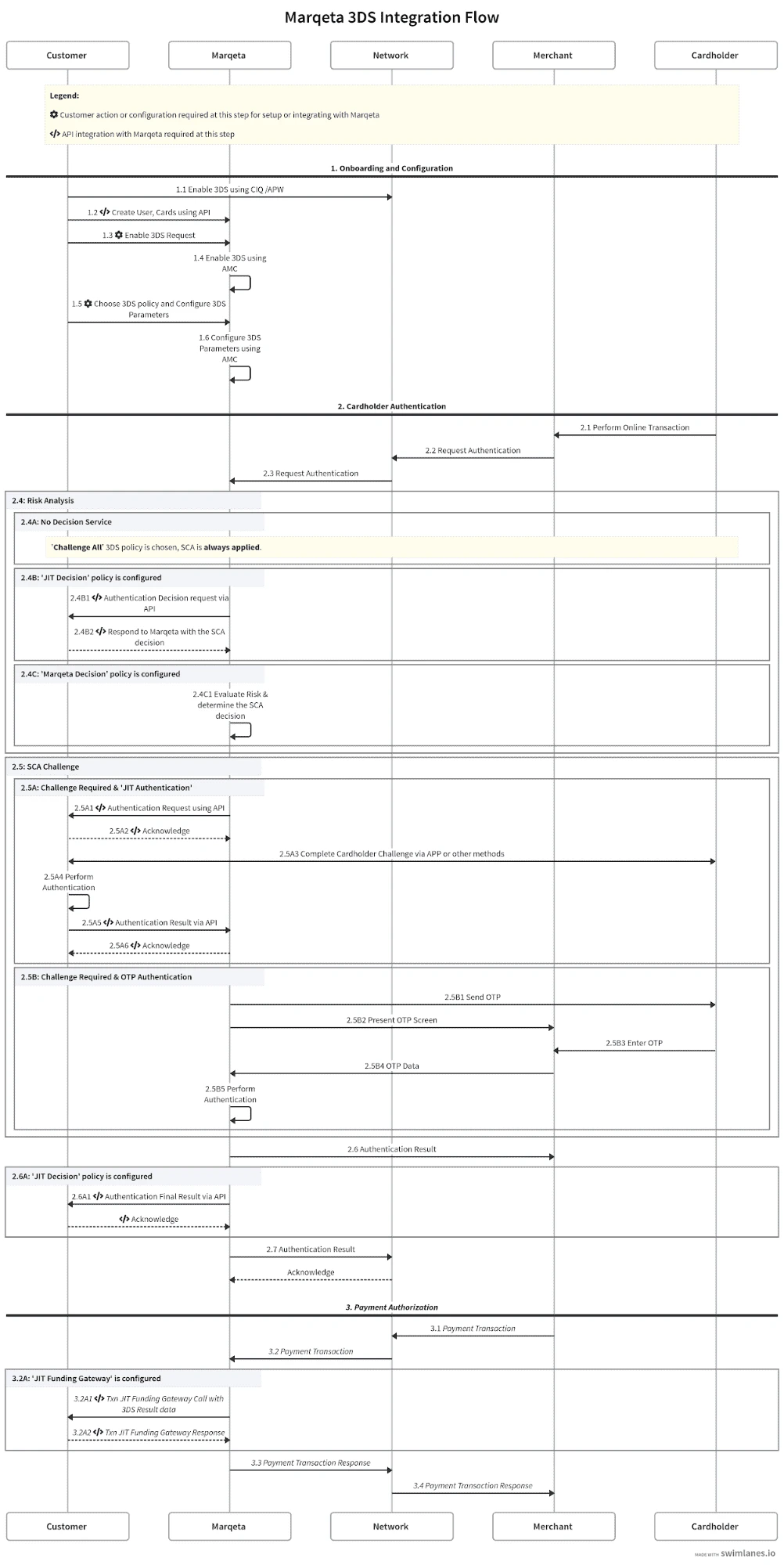
Setup details
The following sections describe in detail the overall flow shown in the figure above, with a focus on the steps where a specific action or API integration is required.Step 1 — Setup and onboarding
| Step # | Summary | Details | Customer Configuration Required | Marqeta API Integration Required |
|---|---|---|---|---|
| 1.1 | Enable 3D Secure using the card network’s CIQ/APW | Enable 3D Secure with the card network using Visa’s CIQ or Mastercard’s APW and other required documents. | No | No |
| 1.2 | Create users, cards using API | Using Marqeta’s API, create users and cards. | No | Yes |
| 1.3 | Enable 3D Secure request | Request to enable 3D Secure with Marqeta through your Marqeta representative. | Yes | No |
| 1.4 | Enable 3D Secure using the Marqeta Dashboard | Marqeta representative enables 3D Secure using app.marqeta.com. | No | No |
| 1.5 | Choose a 3D Secure policy and configure 3D Secure parameters | Choose the appropriate 3D Secure Risk and Authentication options, then contact your Marqeta representative to have the required parameters configured. Configuration Parameters:
| Yes | No |
| 1.6 | Configure 3D Secure parameters using the Marqeta Dashboard | Marqeta representative enables 3D Secure configurations using app.marqeta.com. | No | No |
Step 2 — Cardholder authentication
| Step # | Summary | Details | Customer Configuration Required | Marqeta API Integration Required |
|---|---|---|---|---|
| 2.1 | Cardholder makes an online transaction | None | No | No |
| 2.2 | Merchant requests authentication | None | No | No |
| 2.3 | Card network requests authentication | None | No | No |
| 2.4A | If no decisioning policy is configured: | |||
| Challenge All authentication requests from the 3D Secure requestor and/or merchant | ||||
| 2.4B | If Delegated Decisioning is configured: | |||
| 2.4B1 | Delegated Decisioning request via API | Marqeta’s systems make a web request to obtain a decision from you on whether to apply Strong Customer Authentication (SCA) to the request in picture or exempt it from SCA. You must implement the necessary systems to handle this request. | No | Yes |
| 2.4B2 | Respond to Marqeta with the SCA decision | Your system must respond to the Marqeta system’s request with the SCA decision within the prescribed SLA. | No | Yes |
| 2.4C | If Automated Decisioning is configured: | |||
| 2.4C1 | Evaluate the risk and decide to exempt or challenge the cardholder | No | No | |
| 2.5A | If Challenge All and Advanced Authentication are configured: | |||
| 2.5A1 | Advanced Authentication request via API | Marqeta requests that you authenticate the cardholder (in-app or otherwise), using the API defined by Marqeta. You must be able to process Marqeta’s authentication request using the Marqeta-defined JSON payload. | No | Yes |
| 2.5A2 | Acknowledge | Your endpoint should acknowledge Marqeta’s API request with a 200 OK response. | No | Yes |
| 2.5A3 | Complete cardholder challenge via mobile APP or other preferred method | You request in-app authentication from the cardholder using the mobile banking app or another preferred method such as voice calling. | No | No |
| 2.5A4 | Perform authentication | You perform the authentication. | No | No |
| 2.5A5 | Respond to Marqeta with the authentication result | Marqeta acknowledges with a 200 OK response. | No | Yes |
| 2.5B | If Challenge All and Default OTP is configured: | |||
| 2.5B1 | Marqeta sends OTP via text or email to the registered phone number or email address | None | No | No |
| 2.5B2 | Marqeta presents the OTP screen on the merchant’s website | None | No | No |
| 2.5B3 | Cardholder enters OTP | None | No | No |
| 2.5B4 | OTP data is received by Marqeta | None | No | No |
| 2.5B5 | Marqeta performs cardholder authentication | None | No | No |
| 2.6 | Marqeta sends the cardholder authentication result to the merchant | None | No | No |
| 2.6A | If Delegated Decisioning is configured: | |||
| 2.6A1 | Authentication final result via API | Marqeta’s systems will make a web request to update the authentication results. Your endpoint should acknowledge Marqeta’s API request with a 200 OK response. | No | Yes |
| 2.7 | Marqeta sends the cardholder authentication result to the card network | None | No | No |
Step 3 — Payment authorization
| Step # | Summary | Details | Customer Configuration Required | Marqeta API Integration Required |
|---|---|---|---|---|
| 3.1 | Merchant initiates the payment transaction | None | No | No |
| 3.2 | Card network routes the payment transaction to Marqeta | None | No | No |
| 3.2A | If Gateway JIT Funding is configured: | |||
| 3.2A1 | Marqeta initiates a Gateway JIT Funding request with 3D Secure result data | Marqeta makes a JIT call to your JIT gateway endpoint. This call includes transaction-related information: how the transaction was authenticated and whether or not the authentication was successful. At this time, you can decide to approve or decline the payment transaction. | No | Yes |
| 3.2A2 | JIT gateway response | You respond back to the JIT gateway call with your decision (approve or deny). | No | Yes |
| 3.3 | Marqeta sends the payment transaction response to the card network | None | No | No |
| 3.4 | The card network sends the payment transaction response to the merchant | None | No | No |
Enabling 3D Secure
Contact your Marqeta representative to enable 3D Secure for your program.APIs and contracts
You must provide a URL for the following endpoints, which Marqeta calls during the 3D Secure flow:- Delegated Decisioning – Determine whether to request SCA from the cardholder.
- Notify Marqeta of a 3D Secure completion status.
- Advanced Authentication - Initiate a challenge request related to SCA.
- Update an authentication result to Marqeta.