> ## Documentation Index
> Fetch the complete documentation index at: https://www.marqeta.com/docs/llms.txt
> Use this file to discover all available pages before exploring further.
# About Credit Accounts
> Learn about credit accounts, which center around a single line of credit and derive some of their characteristics from an associated bundle.
A credit account is a revolving line of credit that enables cardholders to borrow funds and have their purchases charged to the account to be repaid later.
Marqeta’s credit platform currently supports consumer accounts, which are accounts held by individuals.
On Marqeta’s credit platform, credit accounts are represented by the `accounts` resource. For the complete endpoint reference, see [Credit Accounts](/core-api/credit-accounts/).
At the end of this guide, you should understand:
* How an account is associated with other resources on Marqeta’s credit platform.
* How an account is originated.
* The lifecycle of an account and what each status represents.
* The account factors that affect how much a cardholder can spend.
* The `config` and `usages` objects.
* Account management and servicing features, such as journal entries, statements, payments, disputes, and more.
Associated resources
Credit accounts are associated with the following resources on Marqeta’s credit platform.
For a summary of all credit resources and how they relate to each other, see [Summary of Credit Resources](/developer-guides/summary-of-credit-resources/).
| Name | Description |
| ---------------------------------------------------------------------------------------------- | ------------------------------------------------------------------------------------------------------------------------------------------------------------------------------------------------------------------------------------------------------------------------------------------------------------------------------------ |
| Bundles | The configurations of the policies that make up a bundle determine the characteristics and attributes of accounts associated with the bundle, which is represented by the `bundle_token`. For more on policies and bundles, see Credit Programs in the Marqeta Dashboard. |
| Credit products *(to be deprecated – see more)* | The configurations of a credit product on your external platform determine characteristics and attributes of associated credit accounts. Credit products are represented by the `credit_product_token`. |
| Account holders | The primary user responsible for the credit account is the account holder, who is represented by the `user_token`. |
| Credit cards | Cardholders can use credit cards to access the available balance on a credit account to make purchases. Credit cards are represented by the `cards` resource. |
For account management resources such as transitions, cards, journal entries, and rewards, see [Account management features](#_account_management_features) in this guide.
For account servicing features such as statements, payments, delinquency, adjustments, disputes, and balance refunds, see [Account servicing features](#_account_servicing_features) in this guide.
Deprecation of credit products
This guide refers to the credit products feature, which is being deprecated and replaced by credit product policies, which is a part of the bundles feature. For more on policies and bundles in a credit program, see [Credit Programs in the Marqeta Dashboard](/developer-guides/credit-programs-dashboard/).
Relationships rules
The following rules apply to **account-card** relationships:
* A credit account can be accessed by multiple credit cards.
* A credit card can access only one credit account.
The following rules apply to **card-cardholder** user relationships:
* A card can be held by only one user, known as a cardholder.
* A cardholder can hold multiple cards.
The following rule applies to **account-account holder** user relationships:
* An account can be held by only one user, known as the account holder.
* A user can be the account holder on multiple accounts.
Account origination
Credit accounts are originated when an applicant accepts the terms of their approved application. Prior to that, you, Marqeta, and the issuing bank (the parties involved vary depending on your credit program) perform a series of steps that include offering an account to a prospective account holder, collecting applicant data and acknowledgments of pre-term files, and more. Your credit program must have an active bundle that is created and activated on the Marqeta Dashboard. For more, see [Credit Programs in the Marqeta Dashboard](/developer-guides/credit-programs-dashboard/).
Once your credit program has an active bundle, prospective account holders can apply for a credit account associated with a bundle and receive a decision on their application. If the application is approved and the applicant accepts, Marqeta originates a new credit account on Marqeta’s credit platform.
Account origination process
The credit account origination process involves a series of steps that you, Marqeta, and the issuing bank perform using the [Applications](/core-api/credit-applications/) endpoints on Marqeta’s credit platform.
* You offer a credit account based on an associated bundle to a prospective account holder.
* The prospective account holder starts an application on your platform.
* You display pre-terms files on the bundle to the applicant.
* You collect applicant information and file acknowledgments and send them to Marqeta.
* Marqeta sends the application data to the issuing bank.
* The issuing bank renders a decision on the application.
* You display post-terms files to the applicant that vary depending on whether the application is approved or rejected.
* If approved, the applicant accepts or declines the credit account offered.
* If the applicant accepts, Marqeta creates a new credit account on Marqeta’s credit platform with the applicant as the account holder.
The account lifecycle
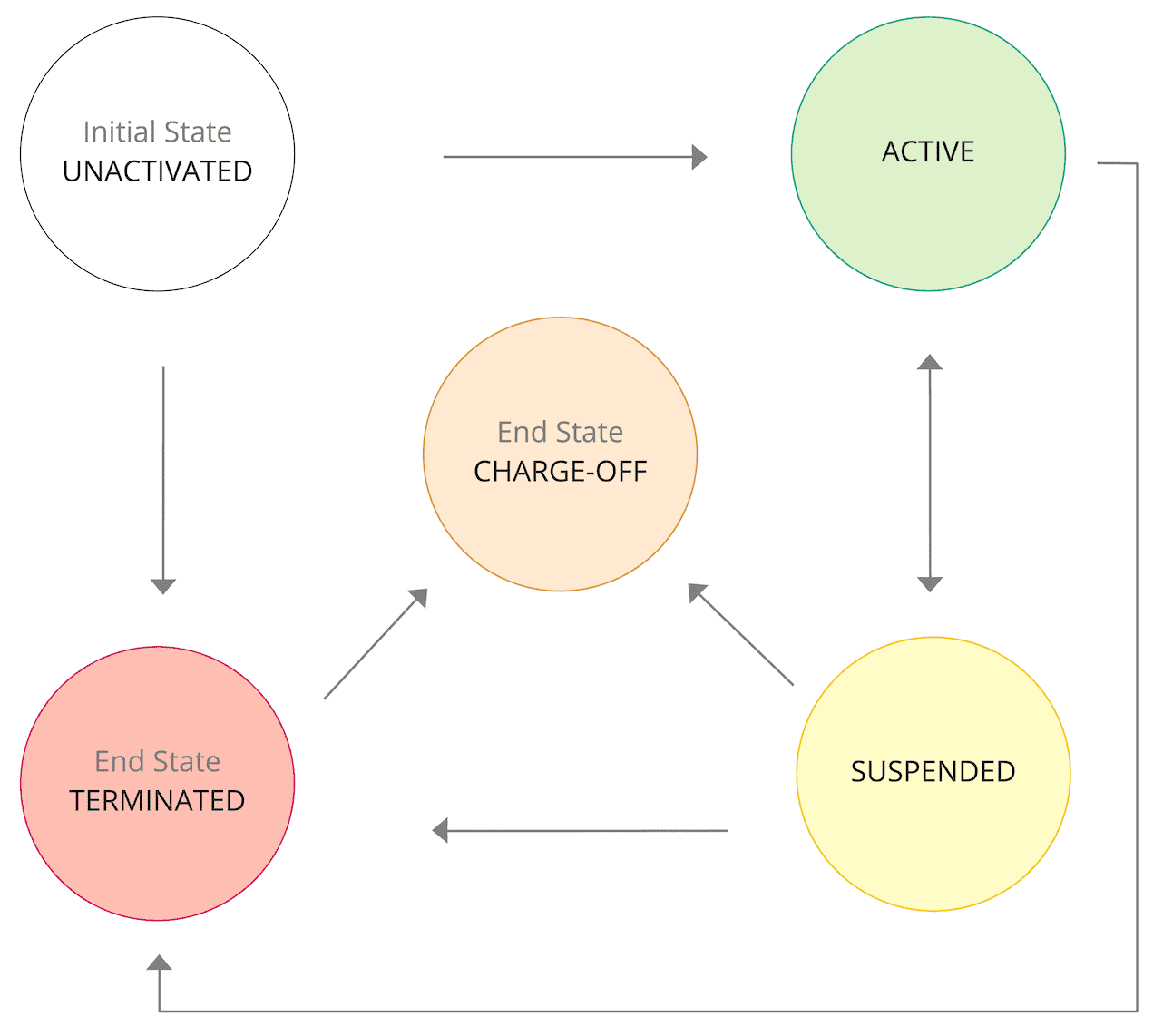
A credit account can have one of the following statuses.
| Status | Description and behavior |
| ------------- | ---------------------------------------------------------------------------------------------------------------------------------------------------------------------------------------------------------------------------------------------------------------------------------------------------------------------------------------------------------------------------------------------------------------------------------------------------------------------------------------------------------------------------------------------------------------------- |
| `UNACTIVATED` | The account is awaiting activation by the account holder. |
| `ACTIVE` | The account is active. The account holder and any authorized users can access the credit line. |
| `SUSPENDED` | The account is temporarily inactive. Its credit line cannot be accessed. |
| `TERMINATED` | The account is closed and permanently inactive. Its credit line cannot be accessed.
New purchases cannot be made.
Only updates to the late payment fee, returned payment fee, or APR can be made using the `/credit/accounts/{account_token}` endpoint.
Credits, such as refunds or original credit transactions (OCTs), may be allowed depending on whether the original transaction was made before the account status transitioned to this one.
New statements are only generated if the account is carrying a balance. |
| `CHARGE_OFF` | The account has an outstanding balance and is permanently inactive. Its credit line cannot be accessed.
New purchases cannot be made.
Updates to the account cannot be made.
Credits, such as refunds or original credit transactions (OCTs), may be allowed depending on whether the original transaction was made before the account status transitioned to this one.
New statements are not generated. |
Payments and rewards are always allowed, regardless of account status. If you want to block rewards and you are a bank, then do not use the `/credit/accounts/{account_token}/rewards` endpoint to create an account reward. If you want to block rewards and you are a brand contributor, then [deactivate your reward account](/core-api/credit-reward-accounts/#update_reward_account) using the `/credit/rewards/accounts/{reward_account_token}` endpoint.
Status transitions
The following diagram outlines the possible transitions between account statuses.
Account substatuses
Use this endpoint to apply and remove a substatus for a credit account. Applying a substatus causes immediate downstream changes to the account. You can apply more than one active substatus to an account at the same time.
**Note**\
If you are a Managed by Marqeta customer, please contact your Marqeta representative if you want to apply or remove a substatus from an account.
| Substatus | Description and behavior |
| ---------- | --------------------------------------------------------------------------------------------------------------------------------------------------------------------------------------- |
| `HARDSHIP` | The account has entered a hardship plan that the account holder has agreed to. |
| `FRAUD` | The account has been flagged for suspicious activity. The account is in a `SUSPENDED` state and cannot transition back to `ACTIVE` status until the `FRAUD` substatus has been removed. |
You can apply one of the following states to a substatus.
| Substatus state | Description and behavior |
| --------------- | --------------------------------------------------------------------------------------------------------------------- |
| `ACTIVE` | This is the initial state of a substatus when it is applied to an account. It indicates that the substatus is active. |
| `INACTIVE` | This state indicates that an applied substatus is inactive. |
Account holder substatuses
Use this endpoint to apply and remove a substatus for a credit account holder or user.
**Note**\
If you are a Managed by Marqeta customer, please contact your Marqeta representative if you want to apply or remove a substatus from an account holder.
When a substatus is applied to a user, all accounts where the user is the account holder will be impacted. Users can have multiple substatuses applied and active at one time, but there can be only one bankruptcy substatus active at one time.
| Substatus | Description and behavior |
| ------------------- | ------------------------------------------------------------------------------------------------------------------------------------------------------------------------------------------------------------------------------------------------------------------------ |
| `MLA` | The user qualifies for MLA, which applies a MAPR with a cap of 36% on the user’s account(s). |
| `SCRA` | The user has provided documentation for qualification of SCRA. This backdates and overrides the user’s account(s) APR to a cap of 6%. It also provides credits for any payments made over 6% from the time of account opening until the active military duty start date. |
| `DECEASED` | The user has been reported as deceased. The user’s account(s) are `TERMINATED`. |
| `POWER_OF_ATTORNEY` | Power of attorney documentation has been submitted for the user. This enables the verified agent to perform actions on the account(s) on behalf of the user through the customer service agent. |
| `BANKRUPTCY` | The user has filed for bankruptcy and has initiated the process for bankruptcy. The user’s account(s) are `TERMINATED` and webhooks collection communications to the user via email are blocked. |
`SCRA` and `DECEASED` substatuses can be in one of the following states:
| Substatus state | Description and behavior |
| --------------- | ---------------------------------------------------------------------------------------------------------- |
| `ACTIVE` | The initial state when a substatus is applied. This state is used to reflect when the substatus is active. |
| `INACTIVE` | This state is used when a substatus has been deactivated. |
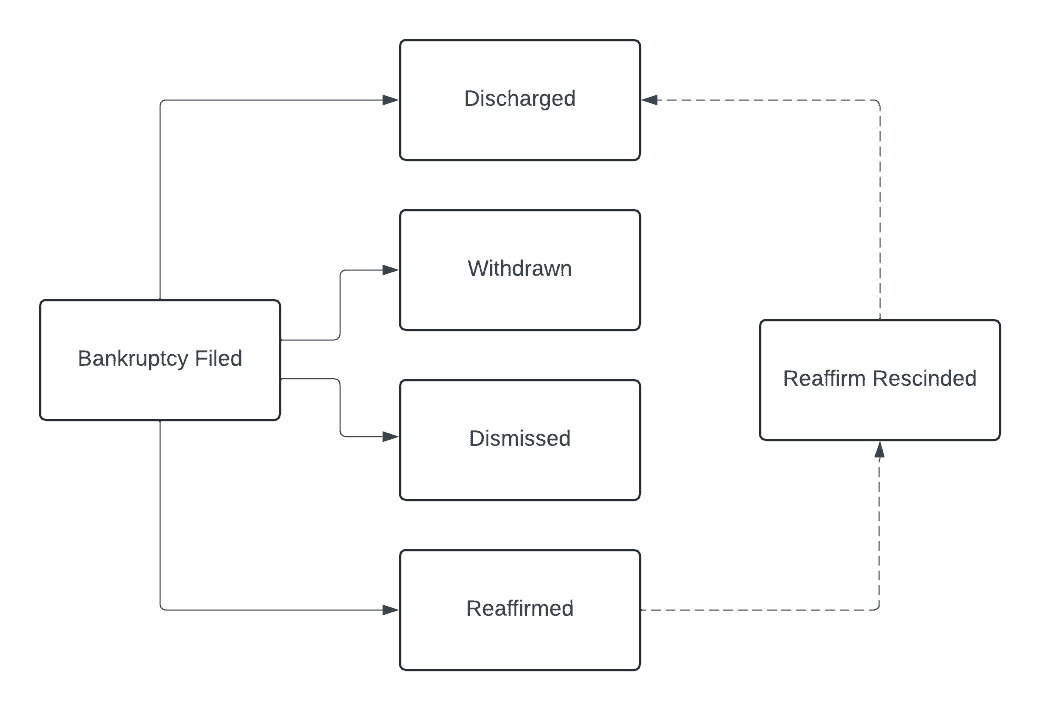
`BANKRUPTCY` substatuses must follow the sequence of events described in the flow diagram following this table. If the substatus' latest state is inactivated, then the substatus reverts to its previous state.
| Substatus state | Description and behavior |
| --------------------------------------- | ------------------------------------------------------------------------------------------------------------------------------------------------------------------------ |
| `BANKRUPTCY_FILED` | The user has filed for bankruptcy and has initiated the bankruptcy process. The user’s account(s) are `TERMINATED` and communications to the user via email are blocked. |
| `BANKRUPTCY_FILED_INACTIVE` | The bankruptcy filing has been reversed. The `BANKRUPTCY` state is inactive. |
| `BANKRUPTCY_WITHDRAWN` | The user has withdrawn the bankruptcy filing. |
| `BANKRUPTCY_WITHDRAWN_INACTVE` | The withdrawn bankruptcy filing has been reversed. The `BANKRUPTCY` status reverts to its previous state. |
| `BANKRUPTCY_DISMISSED` | The bankruptcy filing has been dismissed. |
| `BANKRUPTCY_DISMISSED_INACTVE` | The dismissed bankruptcy filing has been reversed. The `BANKRUPTCY` substatus reverts to its previous state. |
| `BANKRUPTCY_REAFFIRMED` | The user has requested to enter into an agreement to pay off the balance on the account(s) fully or partially. |
| `BANKRUPTCY_REAFFIRMED_INACTVE` | The reaffirmation of the bankruptcy filing has been reversed. The `BANKRUPTCY` substatus reverts to its previous state. |
| `BANKRUPTCY_REAFFIRM_RESCINDED` | The bankruptcy reaffirmation has been rescinded by the court. |
| `BANKRUPTCY_REAFFIRM_RESCINDED_INACTVE` | The rescinded bankruptcy reaffirmation has been reversed. The `BANKRUPTCY` substatus reverts to its previous state. |
| `BANKRUPTCY_DISCHARGED` | The end of the bankruptcy process. The user’s account(s) are written off. |
| `BANKRUPTCY_DISCHARGED_INACTVE` | The discharged bankruptcy filing has been reversed. The `BANKRUPTCY` substatus reverts to its previous state. |
Cardholder’s spending power
The purchase balance, available balance, and credit limit determine how much a cardholder can spend.
* **Purchase balance** - The current balance of the credit account.
* **Available credit** - The amount of credit currently available to use.
* **Credit limit** - The maximum balance an account can carry.
The config object
In the `config` object, you can configure an account’s billing cycle day, payment due day, fees, fee schedules, and more.
Important days
The values for important days on an account are inherited from the credit product policy in its associated bundle, or its associated credit product *(to be deprecated – [see more](#_deprecation_of_credit_products))*.
* The **billing cycle day** is the day of month a new billing cycle begins. At the end of a billing cycle, you bill the account holder for any unpaid purchases and fees incurred during the billing cycle.
* The **payment due day** is the day of month that payment for the previous billing cycle is due.
Fees
The fees configured on the policies in the account’s associated bundle, or associated credit product *(to be deprecated – [see more](#_deprecation_of_credit_products))*, can be defined on the account.
For example, if a late payment fee is configured on the fee policy in its associated bundle, or associated credit product *(to be deprecated – [see more](#_deprecation_of_credit_products))*, then you can set the amount of the late payment fee on the account.
**Note**\
If a fee was not configured on the policies in the account’s associated bundle, or associated credit product *(to be deprecated – [see more](#_deprecation_of_credit_products))*, then it will not be available on the account.
You can configure the following fees:
| Name | Description |
| ---------------- | --------------------------------------------------------------------------------------------------------------------------------------------------------------------------------------------------------------------------------------------------------------------------------------------------- |
| Late payment | A late payment fee is a penalty fee that is charged when the cardholder misses a payment on an account in an `ACTIVE` or `SUSPENDED` status, or `TERMINATED` if the terminated account carries a balance. |
| Returned payment | A returned payment fee is a penalty fee that is charged when the cardholder makes a bounced payment on an account in an `ACTIVE` or `SUSPENDED` status, or `TERMINATED` if the terminated account carries a balance. |
| Periodic | A periodic fee is a recurring fee that is assessed for accounts in an `ACTIVE` or `SUSPENDED` status. If an account transitions to a status other than `ACTIVE` or `SUSPENDED`, its existing periodic fee schedules are terminated. Currently, only annual and monthly periodic fees are supported. |
Fee values are defined at the account level and must be a positive amount. There are no other limits on fee values.
Only one penalty fee can be charged per billing cycle. For example, if an account holder makes two payments that bounce in the same billing cycle, only the first returned payment will incur the returned payment fee. If the same account holder then misses a payment in the same billing cycle, an additional late payment fee will not be charged.
**Important**\
If you are setting the periodic fee value to a value that is not listed in the Terms Schedule, you must send a Change in Terms disclosure to affected account holders and collect their acknowledgment of the disclosure.
You can waive any fee when creating or updating an account by setting the fee value to `0`.
Fee schedules
You can configure multiple fee schedules when creating or updating an account by adding multiple `schedule` objects to the `config.fees` object. If a fee schedule is in effect and you add a second fee schedule with a future `effective_date`, the second schedule’s `value` overrides that of the first when the second schedule’s effective date is reached. This method can be used to set the length of a fee waiver, for example.
You can update a fee schedule by sending a `PUT` request to the `/credit/accounts/{account_token}` endpoint.
If you are updating the value of a periodic fee and want the new value to be in effect the next time the fee is charged, the day of new `effective_date` must be prior to or on the same day that the fee is currently scheduled to be charged. For example, if a scheduled monthly \$10 fee is charged on the 10th of every month and on March 9, you update the fee value to \$15 effective March 11, the \$15 won’t be charged until April 10.
The cut-off time to update a fee schedule is midnight, 00:00 UTC. To ensure a new fee value goes into effect on a chosen date, specify that date as the `effective_date` before 00:00 UTC on the day prior. For example, if you want a fee to go into effect on April 2, 2024, specify `2024-04-02` as the effective date before 23:59:59 UTC on April 1, 2024.
**Tip**\
If you miss the 00:00 UTC cut-off time, you can use the [Adjustments](/core-api/credit-account-adjustments/) endpoint to adjust any accidental fees that were applied to an account.
The usages object
In the `usages` object, you can define how a credit account is used and the types of balances permitted on the account. (**NOTE**: Currently, only `PURCHASE` balance is available.)
Each usage `type` contains usage-based fees and rewards, such as FX fees, that are linked to the purchase balance.
Account management features
The Marqeta credit platform offers the following resources for account management.
| Name | Description |
| ------------------- | ------------------------------------------------------------------------------------------------------------------------------------------------------------------------------------------------------------------------------------------------------------------------------------------------------------------------------------------------------------------------------------------------------------------------------------------------------------------------------------------------------------------------------------------------------------------------------------------------------------------------------------------------------------------------------------------------------------------------------------------------------------------------------------------------------------------------------------------------------------------------------------ |
| Account transitions | An account transition occurs when an account moves from one status to another, such as from `UNACTIVATED` to `ACTIVE`.
For the complete endpoint reference, see Account Transitions. |
| Account cards | Cardholders can use an account card to access the account’s credit line to make purchases.
For the complete endpoint reference, see Account Cards. |
| Journal entries | A journal entry is a record of an entry made on an account journal, such as a purchase transaction, fee, adjustment, and more. Marqeta’s credit platform functions as a system of record for all journal entries made on an account.
For more on journal entries, see About Credit Account Journal Entries.
For the complete endpoint reference, see Journal Entries. |
| Account rewards | An account reward is a one-time reward that is manually added to an account.
For the complete endpoint reference, see Account Rewards.
Creating a reward triggers the creation of a journal entry belonging to the `REWARD` group. For more on reward journal entries, see Rewards in About Credit Account Journal Entries.
**NOTE**: Account rewards are a separate feature from reward programs, which are associated with a reward policy on a bundle and allow you to manage recurring rewards and track reward accruals on an account. For more on reward accounts, see Reward accounts in Implementing Your Credit Program. |
Account servicing features
The Marqeta credit platform offers the following resources for account servicing.
| Name | Description |
| --------------- | ------------------------------------------------------------------------------------------------------------------------------------------------------------------------------------------------------------------------------------------------------------------------------------------------------------------------------------------------------------------------------------------------------------------------------------------------------------------------------------------------------------------------------------------------------------------------------------------------------------------------------------------------------------------------------------------------------------------------------------------------------------------------------------------------------------------------ |
| Statements | A statement contains a summary of account activity that occurred during a billing cycle, such as purchases and other journal entries, interest charges, rewards, year-to-date totals, and more.
For more on statements, see About Credit Account Statements.
For the complete endpoint reference, see Statements. |
| Payments | A payment is made on an account to reduce the account balance, which is the total amount owed on the account. ACH payments can be made if a payment source is linked to the account. Payments can also be made through cash, check, or debit.
For more on payments, including the payment lifecycle, see About Credit Account Payments.
For the complete endpoint reference, see Payments.
Making a payment triggers the creation of a journal entry belonging to the `PAYMENT` group. For more on payment journal entries, see Payments in About Credit Account Journal Entries. |
| Delinquency | An account’s delinquency state reflects whether an account is delinquent and past due on its payments, or current and up-to-date on its payments.
For the complete endpoint reference, see Delinquency. |
| Adjustments | An adjustment can be made to a journal entry amount or the account balance. Reasons for adjusting a journal entry include a dispute initiation or resolution, a returned or canceled payment, or a waived fee. Reasons for adjusting an account balance include an account write-off or the issuance of account credit.
For the complete endpoint reference, see Adjustments.
Making an adjustment triggers the creation of a journal entry belonging to the `ADJUSTMENT` group. For more on adjustment journal entries, see Adjustments in About Credit Account Journal Entries. |
| Disputes | A dispute occurs when an account holder disagrees with a charge on their account. Marqeta helps you manage every step of the dispute process by creating a dispute, retrieving information on the dispute, issuing provisional credits, making account adjustments, and more.
For more on disputes, see About Credit Account Disputes.
For the complete endpoint reference, see Credit Disputes.
Making a dispute triggers the creation of a journal entry belonging to the `DISPUTE` group. For more on dispute journal entries, see Disputes in About Credit Account Journal Entries. |
| Balance refunds | A credit balance refund can be issued to bring a negative account balance closer to 0.00.
For the complete endpoint reference, see Balance Refunds.
Issuing a balance refund triggers the creation of a journal entry belonging to the `BALANCE_REFUND` group. For more on balance refund journal entries, see Credit balance refunds in About Credit Account Journal Entries. |
Tutorial - Originate a credit account
This tutorial walks you through the steps needed to originate a credit account. For the complete account origination process, see [Account origination](#_account_origination) in this guide.
Prerequisites
* An active credit [bundle](/developer-guides/credit-programs-dashboard/#_bundles) - Before you begin, your credit program must have an active bundle that is created and activated on the Marqeta Dashboard.
Step 1 – Display pre-terms to your applicant
Pre-terms are files containing terms and conditions and disclosures that must be displayed to an applicant before their application is submitted. You can [retrieve files](/core-api/credit-applications/#_list_files_on_a_bundle_or_application) from the bundle associated with the account being offered. The following files are pre-terms:
* **e-Disclosure** – Acknowledges that the applicant agrees to receive disclosures electronically.
* **Privacy Policy** – Explains how the information on an application is collected, handled, and processed.
* **Rewards Disclosure Pre-terms** – Discloses detailed information on the rewards program for the account before the application is submitted.
* **Summary of Credit Terms (SOCT)** – Outlines the interest rates, interest charges, and fees associated with the account.
To retrieve pre-terms:
Send a `GET` request to the `/credit/applications/files` endpoint with the `bundle_token` included.
Several files are returned in the response. Display only the pre-terms to the applicant:
* `E_DISCLOSURE`
* `PRIVACY_POLICY`
* `REWARDS_DISCLOSURE_PRE_TERMS`
* `SOCT`
In the response, copy the `tracking_token` for each file displayed. This token tracks the acknowledgment that the applicant has seen the file.
Step 2 – Create an application
After displaying pre-terms to your applicant, collect applicant data and [create an application](/core-api/credit-applications/#_create_application).
To create an application, send a `POST` request to the `/credit/applications` endpoint with at least the following fields included:
* `token` – Set the value to the unique identifier of the application.
* `user_token` – Set the value to the unique identifier of the applicant.
* `bundle_token` – Set the value to the unique identifier of the bundle associated with the application.
* `soct_tracking_token` – Paste the tracking token of the SOCT copied from the previous step.
* `privacy_policy_tracking_token` – Paste the tracking token of the Privacy Policy copied from the previous step.
* `e_disclosure_tracking_token` – Paste the tracking token of the e-Disclosure copied from the previous step.
* `rewards_disclosure_pre_terms_tracking_token` – Paste the tracking token of the Rewards Disclosure Pre-terms copied from the previous step.
* `residence_type` – Set to `OWN`, `RENT`, or `OTHER`, depending on the applicant’s residence situation.
* `monthly_mortgage_or_rent` – Set the value to the monthly amount of the applicant’s mortgage or rent.
* `total_annual_income` – Set the value to the total amount of the applicant’s annual income.
* `primary_income_source` – Set to `EMPLOYED`, `UNEMPLOYED`, `SELF_EMPLOYED`, or `OTHER`, depending on the applicant’s primary income source.
* `any_non_taxable_income` – Set to `true` or `false`, depending on if the applicant has a non-taxable income source.
Initially, the response shows the application in a `CREATED` state. As the application transitions into other states, Marqeta sends webhook notifications containing application data. If a decision on the application has been rendered, the `decision_model` object contains the data that influenced the decision. For more on the event types that trigger a notification, see [Credit application transition events](/core-api/event-types/). For more on webhooks, see [About Webhooks](/developer-guides/about-webhooks/).
You can retrieve application data at any time by sending a `GET` request to the `/credit/applications/{application_token}` endpoint. For more, see [Retrieve application](/core-api/credit-applications#_retrieve_application).
A credit account is originated when the applicant accepts an approved application, which transitions the application state from `APPROVED` to `ACCEPTED`.
Tutorial - Create a credit account
**Note**\
This tutorial guides you through the process of onboarding a credit account if you are creating a credit account from a credit product *(to be deprecated – [see more](/core-api/credit-applications/#_retrieve_application))*. In all other cases, credit accounts are [originated](#_deprecation_of_credit_products) after completing the application process.
This tutorial walks you through creating a credit account and card.
Step one: Obtain a user token
Obtain an existing user token by sending a `GET` request to `/users`. For details, see the [Users API reference](/core-api/users/).
Step two: Create a credit account
Create the credit account and customize its attributes and behaviors.
Send a `POST` request to the `/credit/accounts` endpoint with at least the following fields included:
* `token` — Set the value to a unique identifier of the account.
* `name` — Set the value to the name of the account.
* `bundle_token` - Set to the value of the associated bundle.
OR
`credit_product_token` *(to be deprecated – [see more](#_tutorial_originate_a_credit_account))* and `external_offer_id` — Set to the value of the associated credit product token and external offer id.
* `account_holder_token` — Set to the value of the associated account holder’s token.
* `credit_limit` — Set to the value of the maximum balance the account can carry.
* The `config` object — Include the following fields:
* `billing_cycle_day` — Set to the value of `1`.
* `payment_due_day` — Set to the value of `31`.
* The `fees` array — For each `fees` object, include the following fields:
* `type` — Set the value to the fee type, either `LATE_PAYMENT_FEE`, `RETURNED_PAYMENT_FEE`, `ANNUAL_FEE`, or `MONTHLY_FEE`.
* The `schedule` array — For each `schedule` object, include the following fields:
* `method` — Set the value to `FLAT`.
* `value` — Set the value to the fee amount.
* The `usages` array — For each `usages` object, include the following fields:
* `type` — Set the value to `PURCHASE`.
* The `aprs` array — For each `aprs` object, include the following fields:
* `type` — Set to the value of `GO_TO`.
* The `schedule` array — For each `schedule` object, set the `value` field to the APR value, `1`-`100`.
The following code block shows a sample account as it would appear in a `POST` request:
```json JSON expandable lines wrap theme={null}
{
"token": "my_account_token_12",
"name": "Jack Smith's account",
"description": "Consumer credit account for Jack Smith",
"credit_product_token": "my_credit_product1234",
"user_token": "user1234",
"credit_limit": 3500,
"config": {
"billing_cycle_day": 1,
"payment_due_day": 31,
"fees": [
{
"type": "LATE_PAYMENT_FEE",
"schedule": [
{
"method": "FLAT",
"value": 25,
"effective_date": "2021-04-09T00:35:23Z"
}
]
}
]
},
"usages": [
{
"type": "PURCHASE",
"aprs": [
{
"type": "GO_TO",
"schedule": [
{
"value": 12
"effective_date": "2021-04-09T00:35:23Z"
}
]
}
],
"fees": [
{
"type": "PERIODIC_MEMBERSHIP_FEE",
"method": "PERCENTAGE",
"value": 80
}
],
"rewards": [
{
"type": "AUTO_CASH_BACK",
"method": "PERCENTAGE",
"value": 1
}
]
}
]
}
```
Step three: Create a credit card
Create a credit card to use to make purchases using the account’s available balance.
Send a `POST` request to the `/credit/accounts/{account_token}/cards` endpoint with at least the following fields included:
* `token` — Set the value to a unique identifier of the credit card.
* `card_product_token` — Set to the value of the associated card product’s token.
* `user_token` — Set to the `token` value of the user defined in step one.
**Tip**\
This links the credit card to the account. To further configure the newly created card, send a `PUT` request to the `/cards` endpoint. For more, see [Update card](/developer-guides/about-credit-accounts/#_deprecation_of_credit_products).
The following code block shows a sample credit card as it would appear in a `POST` request:
```json JSON lines wrap theme={null}
{
"token": "my_credit_card1234",
"card_product_token": "my_card_product1234",
"user_token": "user1234"
}
```
Step four: Update a credit account (Optional)
You can update an account’s fees and APRs' type and schedule.
You can use schedules to update usage APRs and config fees. You must pass the `effective_date`, which can be either back-dated or future-dated. Each update to schedules replaces a prior schedule in effect on the credit account.
Send a `PUT` request to the `/credit/accounts/{token}` endpoint with the fields you want to change in the config object or usages objects set to the values you want. You can change the following fields:
* `config.fees.type`
* `config.fees.schedule.method`
* `config.fees.schedule.value`
* `config.fees.schedule.effective_date`
* `usages.type`
* `usages.aprs.type`
* `usages.aprs.schedule.value`
* `usages.aprs.schedule.effective_date`
The following code block shows a sample credit account update as it would appear in a `PUT` request:
```json JSON expandable lines wrap theme={null}
{
"config": {
"fees": [
{
"type": "LATE_PAYMENT_FEE",
"schedule": [
{
"method": "FLAT",
"value": 0,
"effective_date": "2021-04-09T20:57:53Z"
}
]
}
]
},
"usages": [
{
"type": "PURCHASE",
"aprs": [
{
"type": "GO_TO",
"schedule": [
{
"value": 0,
"effective_date": "2021-04-09T20:57:53Z"
}
]
}
]
}
]
}
```
Step five: Update account status (Optional)
Send a `POST` request to the `credit/accounts/{account_token}/accounttransitions` endpoint with the `status` field set to `ACTIVE`, `SUSPENDED`, `TERMINATED`, or `CHARGE_OFF`. For more on account statuses, see [Status](/developer-guides/about-credit-accounts#_step_five_update_account_status_optional) earlier on this page.