

Note
This feature and all information contained herein are currently in beta and subject to change. To learn more about the Beta program for this feature, contact your Marqeta representative.
This feature and all information contained herein are currently in beta and subject to change. To learn more about the Beta program for this feature, contact your Marqeta representative.
What is the PIN Reveal feature?
Marqeta’s PIN Reveal feature allows you to display a cardholder’s forgotten PIN to them via your mobile application, once you have authenticated their identity as the legitimate cardholder. With PIN Reveal, the online PIN is less likely to fall out of sync with the PIN stored on the card’s chip because cardholders can reveal their existing PIN instead of resetting it to a new value. You must first request enablement of this feature in Marqeta Dashboard, then explicitly opt in for your program.PCI compliance and data security
Revealing a cardholder’s PIN requires PCI DSS compliance. You must comply with PCI DSS data security requirements if you want to store, transmit, or process sensitive card data such as the cardholder’s primary account number (PAN), personal identification number (PIN), and card expiration date. A required cardholder verification method is how you authenticate that the individual requesting to view the card’s PIN is the legitimate cardholder and mitigate fraud. The cardholder would be able to view their PIN on their mobile device after successfully completing this supplemental verification step.How to enable PIN Reveal for your program
PIN Reveal functionality is not available by default, and must be explicitly activated for your program. Enabling this feature is a two-step process:- Marqeta enables PIN Reveal as a feature for your program in Marqeta Dashboard.
- You choose to opt in to this enabled feature for your program.
1
Log in to the Marqeta Dashboard for your program. When you first access the Home – Control Center – Program Controls – PIN Reveal page for your program, you will see that PIN Reveal is not enabled.
2
Contact your Marqeta representative directly. The next time you log in, you will be able to access the Program opt in field of the PIN Reveal screen for your program.
3
Log in to the Marqeta Dashboard for your program to request PIN Reveal.
In the Home page, click the notification to access the Home – Control Center – Program Controls – PIN Reveal page where you can choose to opt in to the PIN Reveal feature.
In the Home page, click the notification to access the Home – Control Center – Program Controls – PIN Reveal page where you can choose to opt in to the PIN Reveal feature.
4
The screen displays the program terms for the PIN Reveal feature. In the PIN Reveal Terms of Use section, read and agree to the program terms by selecting the box.
5
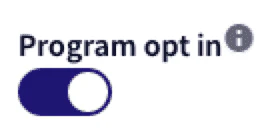
Click the Opt into PIN Reveal toggle so it slides to the right, and click Save settings.Your opt-in request details are sent to Marqeta, including the name of the user who made the request and the timestamp. Pending approval by Marqeta, temporary content replaces the PIN Reveal page.
How to disable PIN Reveal for your program
To remove the PIN Reveal feature from your program, contact your Marqeta representative or use the UI as described below.Note
If you withdraw your agreement to the Terms of Use, you typically must agree to the terms again in order to re-enable PIN Reveal for your program.
If you withdraw your agreement to the Terms of Use, you typically must agree to the terms again in order to re-enable PIN Reveal for your program.
1
Log in to Marqeta Dashboard for your program. Access the Home – Control Center – Program Controls – PIN Reveal page where you can choose to opt out of the PIN Reveal feature.
2
Click the Program opt in toggle so it slides to the left, and click Save settings.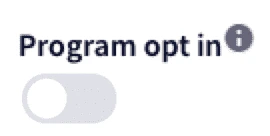
3
Click Save settings.
The screen refreshes to indicate that PIN Reveal is no longer enabled for your program. Your opt-out request details are sent to Marqeta, including the name of the user who made the request and the timestamp. You can view these details in the History section of the PIN Reveal page.
The screen refreshes to indicate that PIN Reveal is no longer enabled for your program. Your opt-out request details are sent to Marqeta, including the name of the user who made the request and the timestamp. You can view these details in the History section of the PIN Reveal page.
Webhooks
Webhooks are notifications about API events, such as when a PIN Reveal occurs. The Marqeta platform sends these notifications as they occur to an endpoint hosted in your environment that has been configured to receive and process them. Below is a webhook event resulting from aPIN_REVEAL request. For more information on PIN-related webhooks, see the Event Types API reference page.
JSON