

- The transaction object and its properties
- The information relayed in transaction responses
- Marqeta’s rules for processing transactions
- The different types of transactions
- Common transaction processing flows
Transaction object
There are several properties within a transaction. The key properties to consider are:type— Determines the type of transaction being requested. For example, ATM withdrawal.preceding_related_transaction_token— References a preceding pending authorization or authorization advice.amount— Indicates the transaction amount.payment_channel— Indicates the type of authorization, which helps you distinguish point-of-sale transactions from e-commerce transactions. Possible values includeATM,ECOMMERCE,MAIL,MOTO,PHONE,OTHER.
JSON
Transaction currencies
The card networks send currency conversion data to the Marqeta platform when a transaction is not in a supported settlement currency, converting that transaction from the local currency into the billing currency of the cardholder. The details of transaction currencies are outlined below.- The network converts the local currency into the cardholder’s billing currency and shares this information with Marqeta.
amountandjit_funding.amountare shown in the cardholder’s billing currency.
- Currency conversion details are shown in the
currency_conversionobject.original_amount— Indicates the amount in the local transaction currency.conversion_rate— Indicates the rate to convert between the local currency and the cardholder’s billing currency.original_currency_code— Indicates the local currency code.
- The network always provides currency conversion information.
- A conversion rate of 1.000000 will be displayed for local transactions.
- The
settlement_dataobject provides settlement data for multi-currency programs.amount— Indicates the amount that will be settled by the network.conversion_rate— Indicates the rate between local and settlement currencies.currency_code— Indicates the settlement currency code.
JSON
Transaction responses
Transactions can be approved or declined for many reasons, such as account funding, card status, and so on. The following attributes are displayed in the response object on the transaction payload to give you more details about the approved or declined transaction:code— Identifies the outcome of the transaction.memo— Corresponds to the code and provides details on the transaction results.additional_information— Provides further clarification of the response, such as:- If the online or offline PIN try limit was exceeded.
- If the velocity control threshold was exceeded.
JSON
JSON
JSON
Marqeta processing rules
Marqeta performs several checks during a transaction to ensure that it is valid and that the card and cardholder are legitimate. These checks are performed before any funding request is made. Marqeta checks commonly include, but are not limited to:Card and cardholder security checks
Card and cardholder security checks are completed during a transaction, prior to requesting Gateway Just-in-Time (JIT) Funding. These checks ensure that the cardholder and the card are in the correct state that allows them to perform a transaction. The JIT Funding gateway is only called after these checks are successfully passed. If a card or cardholder fails any of these checks, you will see one or more of the following response codes:
For a full list of response codes, see Transaction response codes.
Transaction control checks
Transaction control checks confirm that the values in the transaction do not exceed a given threshold, or that the transaction is not restricted in some way. For example, transactions in a contravened country or exceeding your specified spend controls are declined. If a card or cardholder fails one or more of these checks, you will see one or more of these response codes: Certain response codes in the following table are labeled as “optional functionalities.” You will receive response codes for optional functionalities only for those functionalities that have been enabled in your program’s application.
For a full list of response codes, see Transaction response codes.
Digital wallet token checks
Digital wallet token checks pertain to both the creation of digital wallet tokens within the Marqeta system and the attempts to use a digital wallet token during a transaction. These checks ensure that the digital wallet tokens are in the correct state before funding the transaction. They also apply when Marqeta has requested step-up authentication, or has declined a token provisioning attempt. If a card or cardholder fails one or more of these checks, you will see one or more of the response codes listed below. Certain response codes in the following table are labeled as “optional functionalities.” You will receive response codes for optional functionalities only for those functionalities that have been enabled in your program’s application.
For a full list of response codes, see Transaction response codes.
Transaction types
European countries use a dual-message service, which refers to transactions that process the clearing and settlement hours or days after the authorization. The single-message format is used in the US, and it uses one message for both functions. For European issuers, transactions in the US that use single-message are converted to dual-message. Issuers in Europe should not expect to receivepindebit transactions.
Transaction types are split into two main categories:
1
Actionable events, which require an approval or action from you.
2
Informative events, which are notifications of ledger impact that do not require your action or approval.
Linking transaction events
A token is a unique alphanumeric string that pertains to a single transaction event. Including various token fields in a transaction payload identifies specific aspects of an individual transaction. You can use the tokens in these fields to link separate transaction events. For examples of linked transaction events, see Transaction flows. Thepreceding_related_transaction_token maps back to a previous, related transaction, which may or may not be the original transaction. However, you can use the following variations of the preceding_related_transaction_token field to create a chain of tokens that will link back to the original authorization. See the definitions and the code sample below.
Note
Use the tokens in the following table for JIT Funding only.
Use the tokens in the following table for JIT Funding only.
Note
Use the following tokens only for prefunded transactions or when using Commando Mode for your JIT gateway.
Use the following tokens only for prefunded transactions or when using Commando Mode for your JIT gateway.
JSON
Transaction flows
Transactions follow common flows. These are largely based on merchant behavior, so the transactions shown here are a non-exhaustive set. Marqeta must process all clearings. Your system must be sufficiently flexible to accept clearings that do not conform to these flows. For more information on concepts relevant to payment card systems, as well as concepts specific to the Marqeta platform, see Payment Cards Concepts.Successful transaction flows
The following flow diagrams illustrate examples of transactions occurring as expected and without error.Authorization and clearing
Normally, merchants submit authorization events to place a hold on a certain amount of funds in the cardholder’s account. Merchants submit clearings to capture the final funds in the same amount as the authorization. Clearings can be higher if they include tips or fees, or they can be lower than the original authorization hold. You must account for this when developing your system. Merchants can also submit multiple clearances for an individual authorization event, which can occur if individual items from a single order ship one at a time.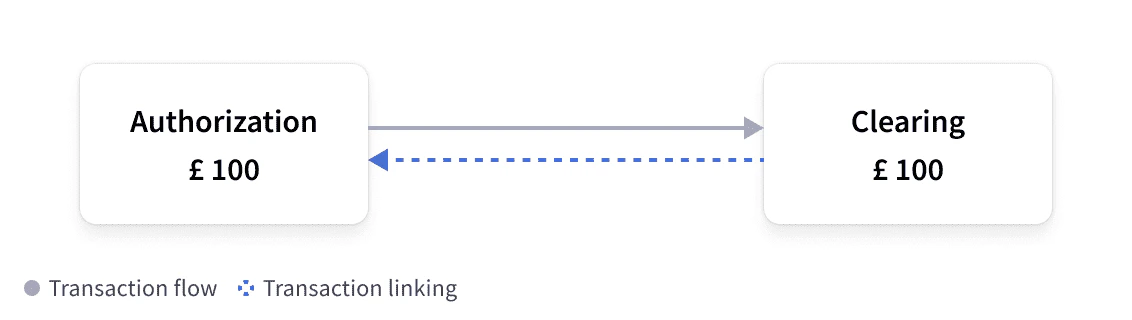
Clearing only
In some cases, you will receive a clearing without a linked authorization. In these cases, the clearings would not contain apreceding_related_transaction_token field. See below for some scenarios in which this might happen.
Examples of “clearing only” transactions are:
- Offline transactions are made without network connectivity, such as in an airplane, toll road, or car park.
- Force posts that happen when Marqeta does not have sufficient criteria to match an authorization to a clearing, in which case, Marqeta is mandated to force post the transaction without a matching authorization.
- A force capture, in which the merchant clears a transaction without any preceding authorization.
Authorization and reversal
If merchants want to undo an authorization hold that they have placed on a cardholder’s account, they must submit a reversal. Submitting a reversal means that the authorization hold has been either reduced or released. Reversals often occur when a transaction is canceled or a particular item is out of stock, and therefore the hold is released for the amount of that item.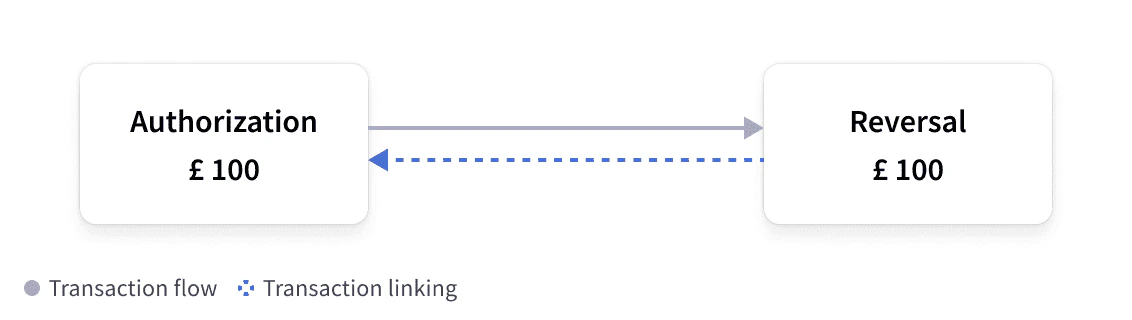
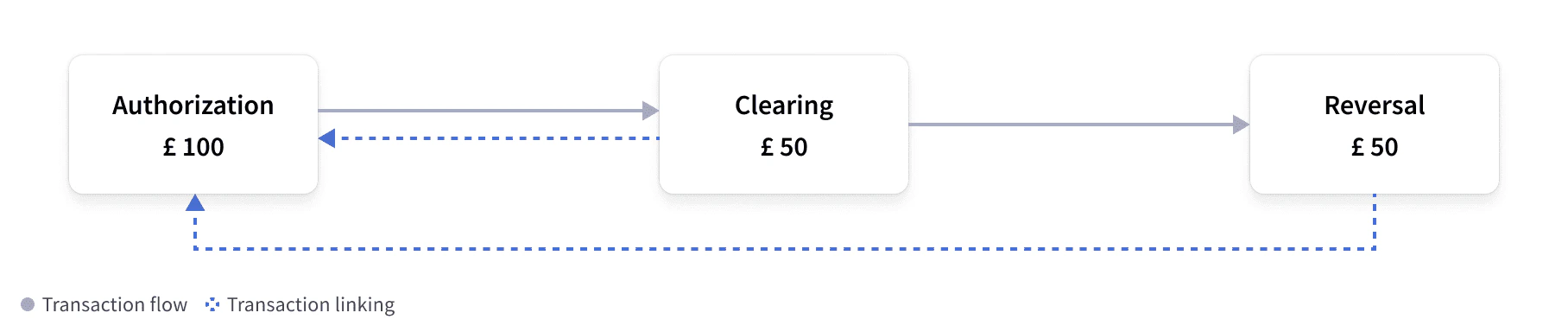
Authorization and partial clearing with reversal
A merchant can also capture a partial amount of funds and release the rest back to the cardholder. Merchants can perform these actions in any order, but the authorization must still be in aPENDING state.
Authorization and incremental with clearing
This event flow allows merchants to increase the amount of funds in a pre-existing authorization hold, and it typically occurs when a cardholder adds a tip or extends a reservation, such as a hotel or car rental. An incremental authorization only increases the amount of an authorization hold when the clearing event is submitted, and it is linked to the original authorization. The clearing amount will reflect the combined amount of authorization plus any incremental amounts.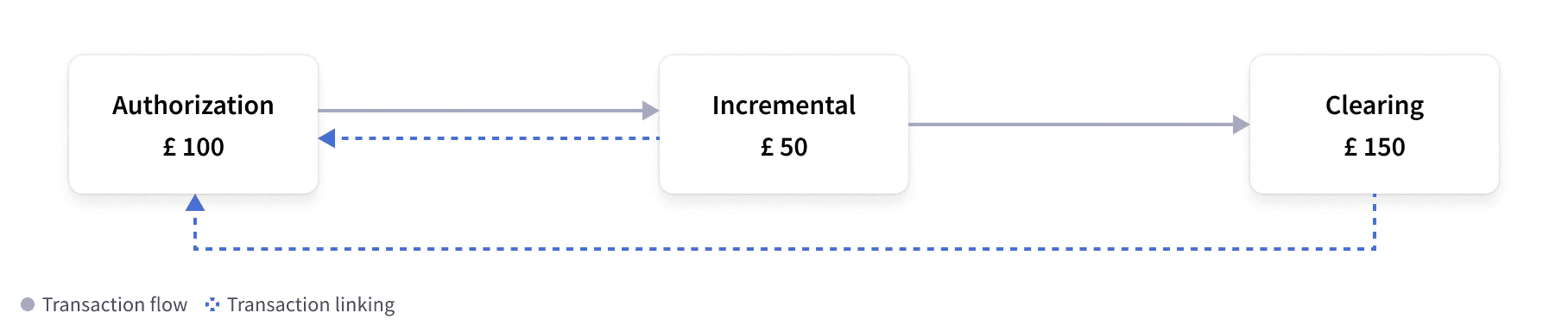
Authorization and advice with clearing
This flow occurs when a merchant needs to reduce an existing authorization hold for a transaction. Advice events use the same method as reversals, and are also supported wherever reversals are supported. An advice event replaces the existing authorization with a lower amount. These events typically occur when using automated fuel dispensers, where the actual amount is not known at authorization time, but the authorization is updated as soon as the fuel has been dispensed. Marqeta’s system processes the transaction, but only sends information about the amount that must be released, using the same method as a reversal.
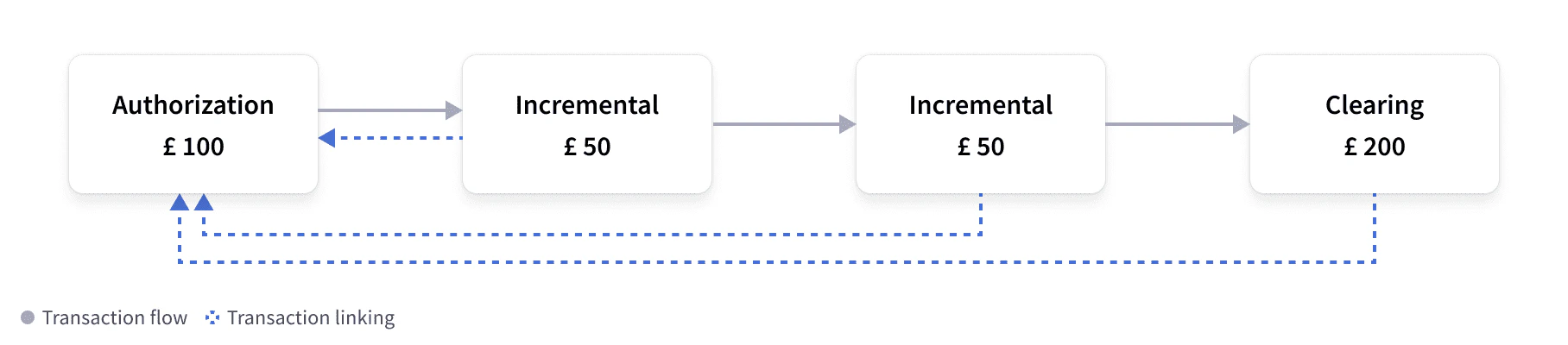
Authorization and multiple incrementals with clearing
This flow depicts the same flow as Authorization and incremental with clearing, in which the merchant increases the amount of an existing authorization hold. However, in this situation, the authorization hold has been increased twice. Usually there is only one event, but there is no limit to the number of events that are possible in this situation. In this type of event, all incrementals link back to the original authorization and the clearing event contains the combined amount of the authorization hold and all incremental amounts. Marqeta populates theincremental_authorization_transaction_tokens field within the clearing event to show the original authorization and the incrementals linked to it.
Authorization and partial clearing with expiration
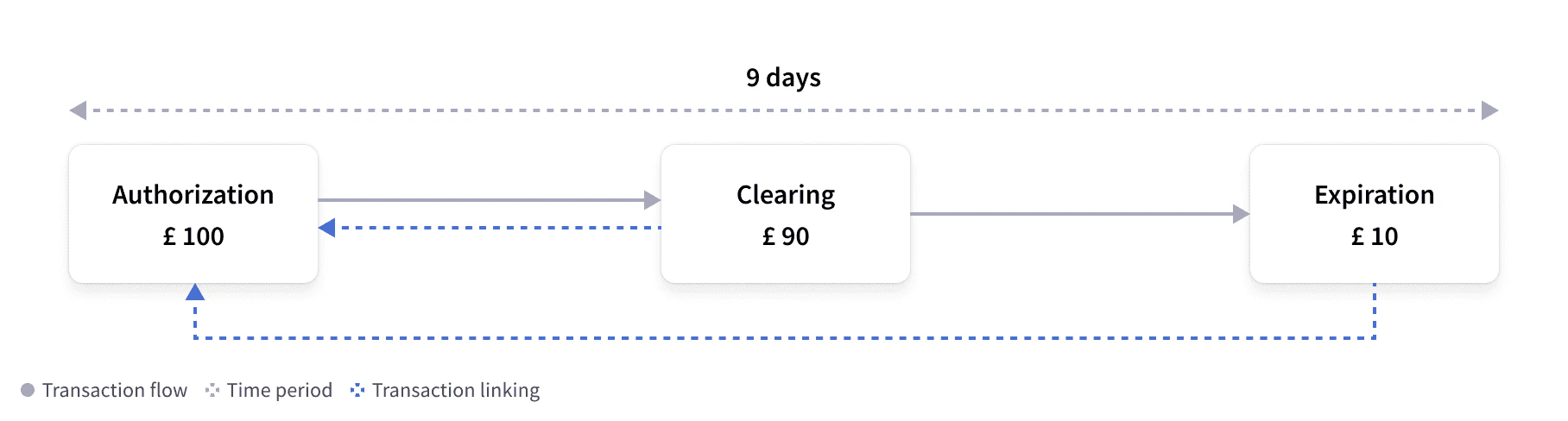
If a merchant partially captures an authorization hold, then the remainder of the authorization hold will stay on the cardholder’s account. Merchants should immediately reverse the authorization hold. However, if a merchant does not reverse the charge, Marqeta’s authorization expiration job releases the pending authorization hold on the cardholder’s account after a certain amount of time.Note
Typically, the time frame for releasing pending authorizations is nine days from the time of authorization. The time frame is defined by Marqeta and depends on your system’s configuration.
Typically, the time frame for releasing pending authorizations is nine days from the time of authorization. The time frame is defined by Marqeta and depends on your system’s configuration.
Authorization and clearing with refund
In this flow, the cardholder has completed a transaction that has fully cleared, but the cardholder is requesting a refund. This can happen when, for example, a cardholder returns goods to a merchant. Merchants must send a refund event, which is a unique event that credits a cardholder account, and does not need to be linked back to an authorization event. The Marqeta system displays separate events for the initial authorization and the clearing events.
Authorization and clearing with partial refund
Similar to the flow described in Authorization and clearing with refund, merchants can also send a partial refund so that only a partial amount of the funds captured in the original authorization can be refunded. This can happen if, for example, the cardholder returns one of many items purchased in a single transaction.
Authorization attempt and STIP decline
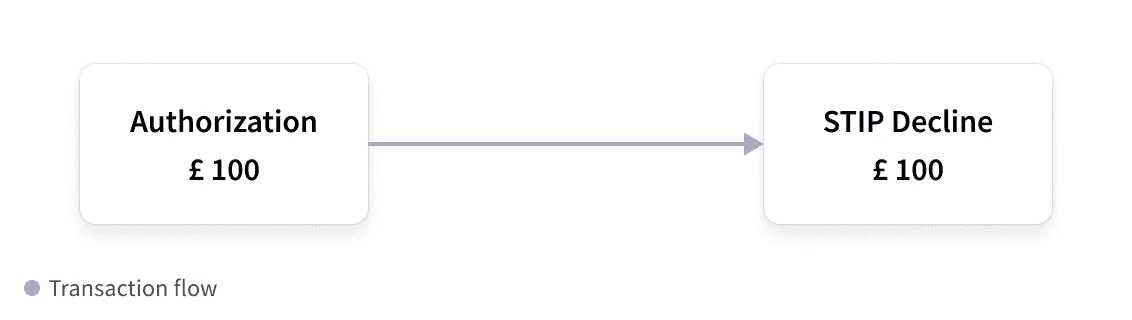
If the Marqeta platform is not available to handle authorizations, the card networks intervene using a process known as Stand-in Processing (STIP). A STIP decline happens when there is an attempt to authorize a transaction but it cannot be processed. At that time, the card network steps in and makes the final decision about the authorization. A STIP decline can occur for many reasons. The fieldstandin_reason can provide details as to why the STIP decline happened. In this example flow, Marqeta did not see or process the original authorization and did not respond to the event. Therefore, no funds were held and an informative STIP event was provided. For more details, see Network Stand-in Processing decline.
As card networks do not have access to cardholder balances, you would typically configure your application to use STIP to decline authorizations in such a scenario. However, you can set up your configuration to approve certain amounts, if you wish.
Failed authorization and STIP decline with reversal
If Marqeta returns a response to the card network that is later declined, the card network sends Marqeta two events: the original STIP message and a standard reversal event. This can happen, for example, if a timeout occurs or if there is an issue with the acquirer. See Authorization attempt and STIP decline for further details. This method ensures that any held funds are released from the cardholder account, as the authorization has been declined. For more details, see Network Stand-in Processing decline.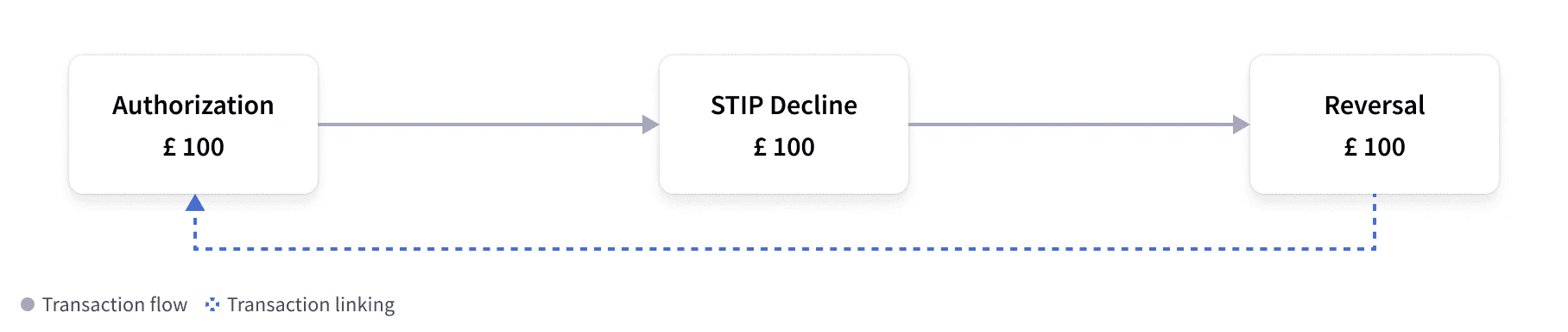
Possible transaction errors
The following flow diagrams illustrate examples of transactions with errors or unexpected behaviors.Authorization and unlinked clearing (duplicate charging) with expiration
In this flow, the merchant submits a clearing for an authorization that was completed, but the clearing did not link to the authorization. This scenario causes “double charging,” where an authorization hold has already been placed on the cardholder account from the original authorization, but there is an additional hold placed on the cardholder account for the final amount from the clearing event. This might happen when fields provided by the merchant differ from that of the authorization. Marqeta’s issuer expiration event can remediate this situation by releasing the authorization hold from the original authorization back to the cardholder so that those funds become available again.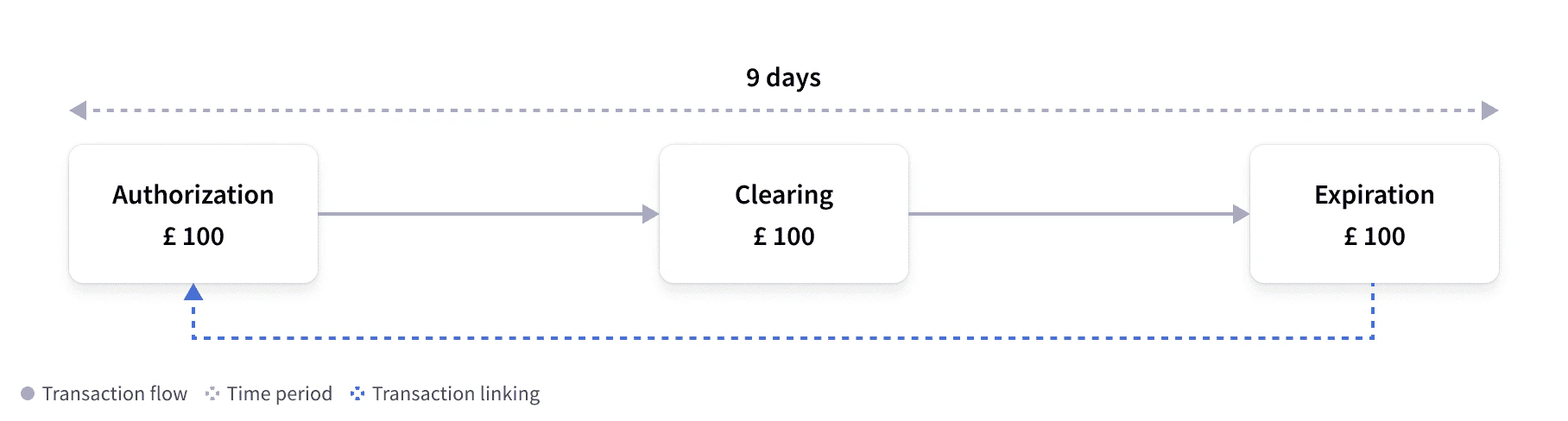
Authorization and expiration with clearing
In this flow, the authorization has expired and the held funds have been released, but a clearing event has been submitted after the expiration. The time frame of an expiration is predefined; however, it does not stop merchants from submitting clearings after an initial authorization has expired. As a result, a clearing can be “force posted” and, if possible, Marqeta will attempt to link the clearing event to the original authorization within 21 days of that authorization.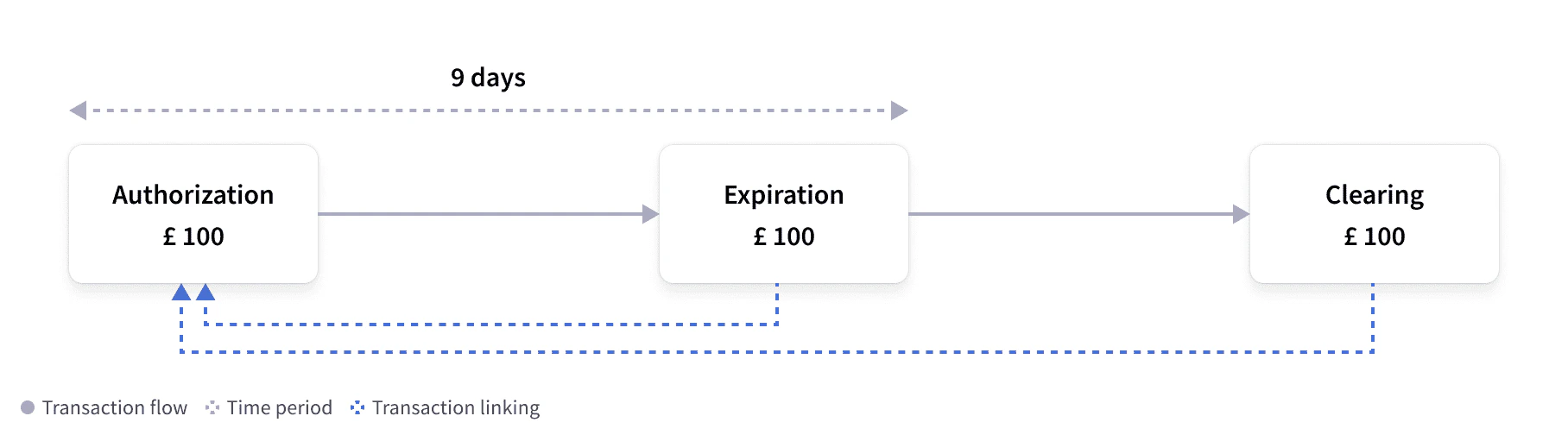
Authorization and clearing for higher amount
Sometimes merchants submit clearings that are higher than the original authorization amount. This typically happens when processing additional tips or fees, and it can lead to negative cardholder balances. You should consider how you would like to handle these situations, as clearings are informative events that must be processed and applied to the cardholder’s account.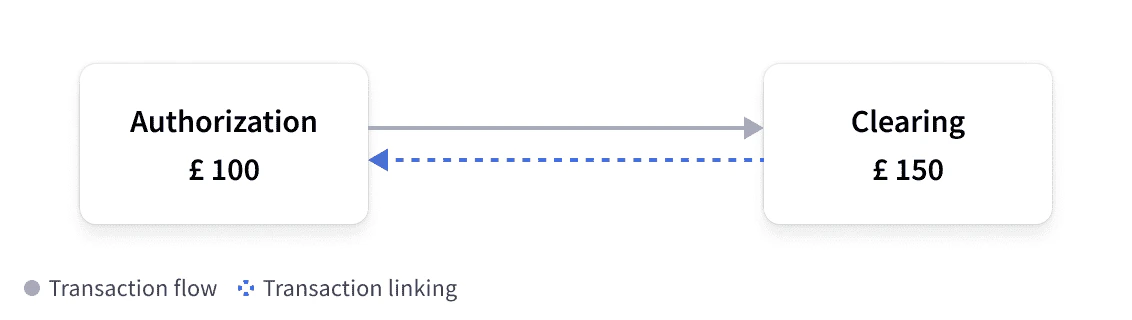
Clearing matched to authorization instead of advice
Merchants sometimes provide differences in data elements when clearing transactions, which can cause problems when linking clearings to the appropriate advice message. If Marqeta cannot link a clearing to the advice, then Marqeta can link the clearing to the original authorization. Marqeta is continually improving matching logic to reduce the possibility of such an occurrence.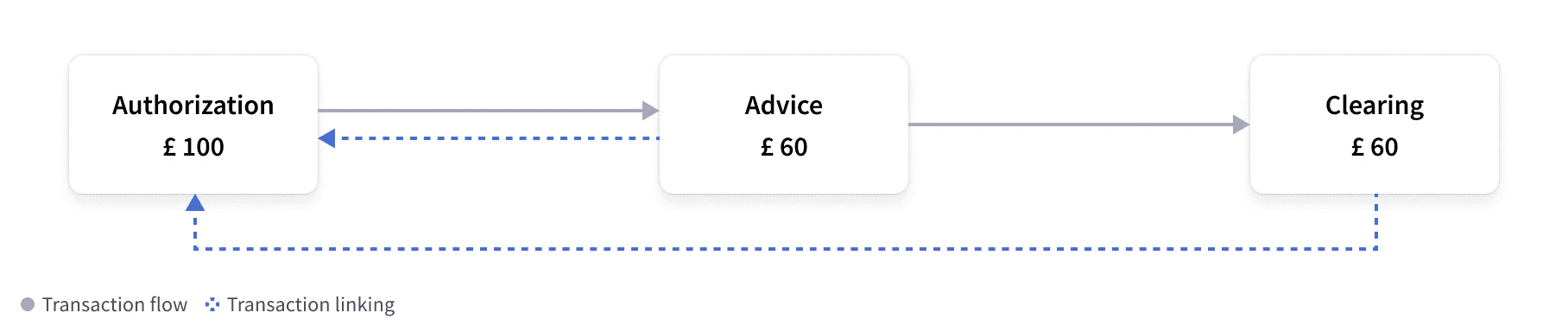
Refund authorization and unlinked refund clearing (duplicate charging) with expiration
Merchants can send refund events that are authorized prior to sending the refund, which are known as online refunds. Merchants can then confirm whether the card is still active before sending the refund. Unlike other events, cardholder funds must not be adjusted until the clearing event has been received. Marqeta will attempt to link the refund clearing to the refund authorization whenever possible. If Marqeta cannot link the refund clearing to the refund authorization, then the standard issuer expiration and refund events are used to link them.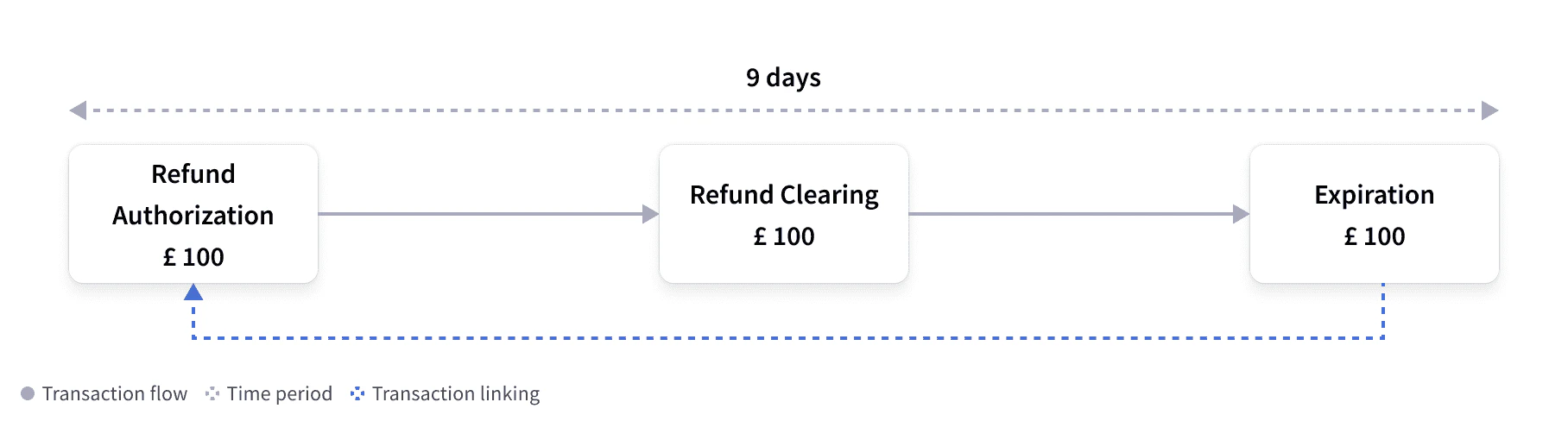
Network Stand-in Processing decline
Stand-in Processing (STIP) occurs when one party in the authorization flow is unable to complete processing within the time allocated or when specific transactional rules are set up at the network level. In such cases, card issuers can let the card network approve transactions on their behalf. When a transaction is processed using STIP, the Marqeta platform sends an informative event webhook that has no impact on the cardholder balance. Thestandin_reason provides a reason for the STIP decline. Common reasons include, but are not limited to:
issuer_timeoutissuer_unavailableacquirer_issuesuspected_fraud_transaction
- Authorizations that the Marqeta platform did not receive.
- Authorizations that the Marqeta platform received and processed.
JSON
Commando Mode transactions
Marqeta Commando Mode can be configured to be enabled manually or invoked automatically after specific criteria has been met. Marqeta provides three seconds for funding requests to be approved before stepping in to approve on your behalf (if configured to do so). Any event approved during Commando Mode will contain a different funding source, which does not contain thejit_funding method. In this event, the type field can be used to determine the funding event and the cardholder impact for that transaction. The preceding_related_transaction_token will link to the previous authorization, which was approved via COMMANDO_AUTO or COMMANDO_MANUAL.
For more information, see Commando Mode.
JSON
JSON
Card acceptor object
The card acceptor object displays specific details on where the card is being used. This contains information about the card acceptor, such as the merchant identifier (MID), merchant category code (MCC), or MCC group.mid— The merchant identifier used to identify the merchant. This can be used to block specific merchants from transacting.mcc— The merchant category code used for categorizing merchants. For example, code 7321 refers to rental cars.name— The merchant name. This can vary between authorization and clearing.city— The merchant city.
JSON
Point of sale object
The point of sale (pos) object will provide key details on how the card was used. It indicates the type of terminal, what input capability the terminal has, and how the card was presented.
pan_entry_mode— Details how the card was presented to the terminal. Values consist of, but are not limited to:CHIP— The card was inserted into the chip reader of the terminal.CHIP_CONTACTLESS— The card was tapped contactlessly on the terminal.MANUAL— The PAN was manually entered. This is common for e-commerce.
card_presence/card_holder_presence— The card and cardholder were present. This istruefor most point-of-sale transactions andfalsefor e-commerce transactions.partial_approval_capable— The merchant allows for part of the funds to be approved. The true amount approved can be lower than the requested amount.pin_present— The PIN was entered and passed to the Marqeta platform for validation. This istruewhen the online PIN is used and passed to the Marqeta platform. This isfalsefor offline PIN transactions.card_data_input_capability— The terminal capability, including if the terminal can support CHIP. Values includeCHIP,CHIP_CONTACTLESS,KEY_ENTRY, andMAG_STRIPE.
JSON
Fraud object
The fraud object displays risk parameters and the likelihood that a transaction is or is not fraudulent. On the network side:transaction_risk_score— The transaction fraud risk score calculated by the card network; a higher score indicates a higher risk. Values include 1-99.
rule_violations— Rules flagged at transaction times. Values include[String].recommended_action— Transaction-specific suggestions based on the rules defined for the program. When a rule is triggered, the value isDECLINE. Values includeAPPROVE,DECLINE, andNOT_PERFORMED.
JSON