

Getting started
This troubleshooter outlines common issues that could arise when using the Marqeta platform. It also provides useful insights to allow you to address these issues without the need for direct interaction with Marqeta’s support team. Marqeta provides you with the information you need in several ways:- Marqeta Just-in-Time (JIT) Funding – The Marqeta platform sends actionable events to your JIT gateway, enabling you to approve or decline a transaction.
- Marqeta webhooks – Informative events sent to webhook endpoints notifying you that an event has occurred.
- Marqeta API – An API endpoint used to create, update, and retrieve relevant items from the Marqeta platform, such as card and cardholder information, as well as transaction data.
- Marqeta Dashboard – Marqeta provides an online user interface (UI) and portal that is designed to display reports and other program data for customers.
Onboarding and webhooks
Configuring webhooks is a key part of your integration with Marqeta’s Core API. Webhooks are notifications that the Marqeta platform sends when API events occur, for example, transactions and card transitions. API events keep your system in sync with the Marqeta platform and allow your system to perform important operations, such as settlement and reconciliation.Submitting a support ticket
After triaging the issue, you can submit a support ticket by emailing support@marqeta.com if you require Marqeta’s assistance. Include the following required information with your message:- API URL
- Card token(s)
- End of customer impact, if applicable
- Examples
- Expected result
- Impacted service
- Summary of issue
- Time and time zone of occurrence
- Transaction token(s)
- Type of request (issue, question, request)
Processing transactions
Marqeta’s transaction processing platform receives and parses raw ISO data from payment networks. The platform then converts these data into a usable JSON format that can be passed to you through a JIT gateway or by webhooks. Marqeta will send data to your system in JSON format, and then correctly map these data back to ISO standards during communication between Marqeta and the payment network. Marqeta provides a variety of data that can help identify a transaction using the JSON sent through a JIT gateway, webhooks, or an API. In addition, Marqeta’s transaction investigator gives you a dashboard to quickly and easily examine the details of a transaction. Marqeta has implemented additional functionality within the Marqeta Dashboard that allows you or your customer service representatives to investigate a particular transaction in greater detail. These features offer detailed insights into transaction authentication and outcomes, including any related transactions for that payment. If you use Marqeta Dashboard, you can view transaction details without having to build internal custom reports or views. Even though this information is readily available in the Marqeta Dashboard, Marqeta recommends storing any important data in your internal system, in case you need it later for custom reports. You can access transaction details by navigating to the User Lookup > Transactions view and selecting a transaction to investigate. In the Transactions view, you can see detailed data about the transaction, which will help you understand the authentication process and subsequent related events.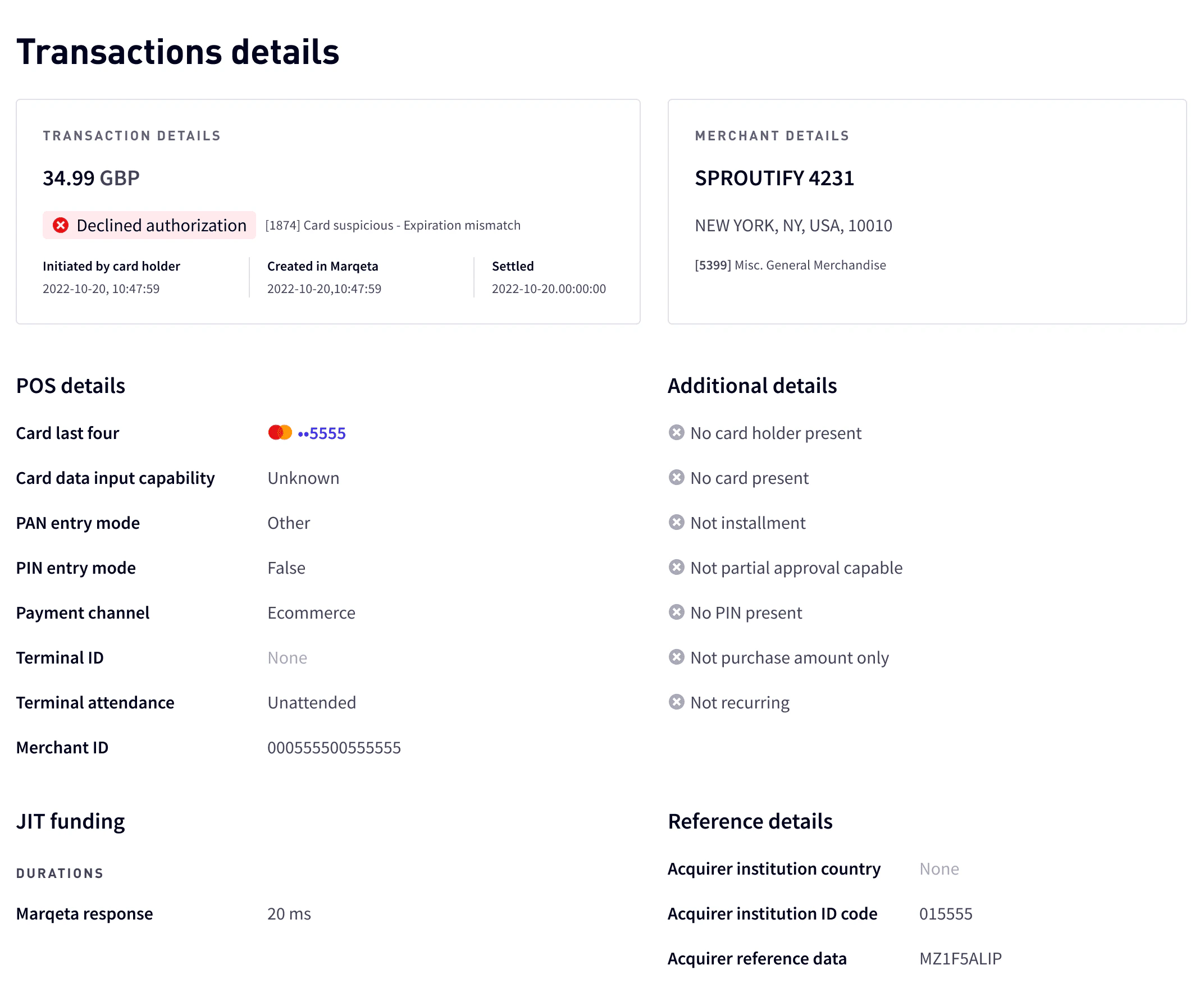
Troubleshooting authorization issues
Aside from recurring payments, authorizations typically occur in real time and are initiated by the cardholder. If an authorization failure occurs, the first step of your investigation should be to ascertain whether or not the transaction data had reached Marqeta. This information will help you determine at which point in the payment sequence the authorization failed. Using the Marqeta Dashboard, you can search for transactions originating from this cardholder. Key data elements, such as the transaction amount, the date and time of the transaction, and the merchant involved, are helpful when diagnosing transaction authorization failures. The following tables describe the possible causes for authorization failures that can occur at the point of sale (Merchant), with the acquiring bank (Acquirer), during transmission (Network), or during processing (Marqeta).Failure type 1 — Authorization attempt does not appear in the Marqeta Dashboard
Failure type 2 — Authorization attempt appears in the Marqeta Dashboard
Marqeta Dashboard provides additional context for those transactions that appear in the dashboard. You can use this supplemental data to investigate these transactions further, when needed.Stand-in Processing (STIP)
The different parties involved in card transactions have fallback measures in place to ensure that cards continue to function in the event of a system failure during the transaction process. If the card network cannot connect to the Marqeta platform, it performs STIP. The card network makes authorization decisions as necessary and subsequently notifies the Marqeta platform with information about the transactions that occurred while STIP was enabled. If there has been a system failure, you can see whether STIP was needed and who handled the transaction by checking thestandin_by field of a transaction. If STIP was performed, the field will have a value of NETWORK. If the transaction also has a standin_approved_by field, it means that the transaction was approved.
The standin_reason field gives the network’s justification for the STIP. Since this field uses a string for its values, Marqeta cannot rigidly define what appears there. Some possibilities that you might encounter include the following:
-
issuer_timeout -
issuer_unavailable -
acquirer_issue -
suspected_fraud_transaction
STIP received, but Marqeta has no record of the original authorization
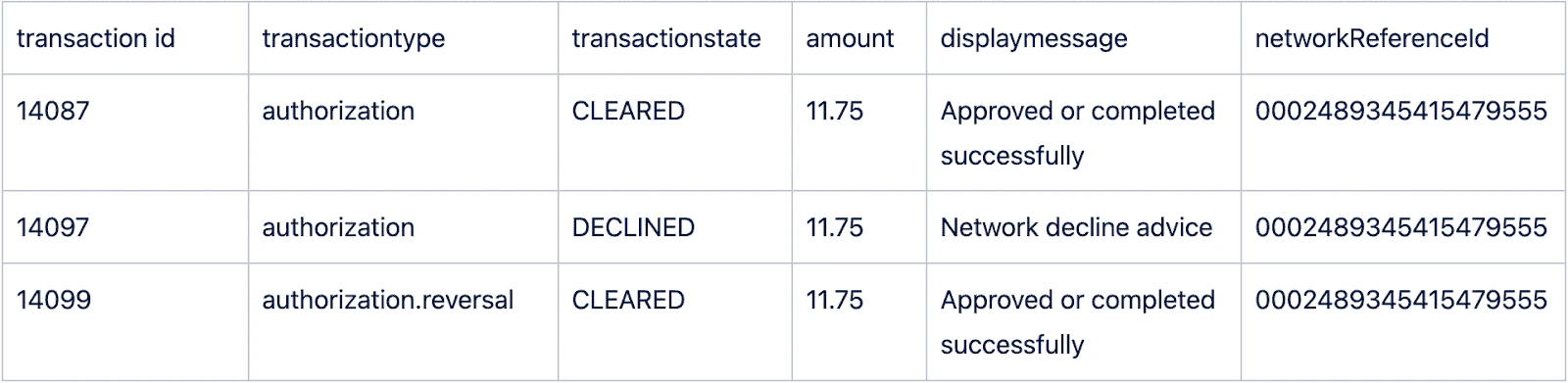
As Marqeta never received the original authorization for the transaction, there are no charges to reverse. For this reason, the notification about the authorization will statenetwork decline advice, followed by a transaction of type authorization.reversal.

STIP received, and Marqeta has a record of the original authorization
In this scenario, the flow is the same as in the previous example, except that in this case, Marqeta did receive the original authorization. For this reason, the effect of that first authorization was reversed.- If JIT Funding has been used for an approval, it will show in the first transaction.
- If the merchant has declined the transaction, then there is no need for a reversal.
Troubleshooting clearings
The clearing lifecycle
Approximately once a day, clearings are batched by the merchant and submitted to the acquirer. The clearings are then sent to the card network for all completed authorizations from that merchant for that day. The card network then splits the clearings into relevant issues and passes them on to Marqeta for processing. The Marqeta platform extracts data regarding individual customers, and groups them by customer for processing. Marqeta then sends webhooks to those who have subscribed to notifications about relevant events within the platform. Merchants process clearings to capture the final purchase amount made by cardholders. This usually consists of an authorization, followed by a matching clearing event. However, each use case can differ, and should be handled accordingly.Linking clearing events
All clearing events must be processed, regardless of prior authorization status or amount, as the card network is already in the process of settlement and they will charge the issuer for these transactions. If there are any discrepancies, issuers must follow their chargeback processes when disputing transactions. Marqeta’s matching service will attempt to link clearing events to previous transaction authorizations whenever possible. If this is not possible, Marqeta will authorize a clearing event (authorization.clearing) without a preceding_related_transaction_token, using the JIT Funding method of pgfs.force_capture. This kind of authorization can happen in the following scenarios:
- In offline transactions when an authorization (direct clearing) is not possible, such as transactions made while on an airplane.
- When there is poor merchant data, or when key fields do not match, and the confidence score is not high enough to warrant matching transactions.
Variations and holds
Clearing amounts could be higher than the original authorized amount in the following scenarios:- When the clearing amount is within an additional 20% of the authorized amount. This often happens with taxis, restaurants, and health and beauty services, to accommodate tipping.
-
Public transport Merchant Category Codes (MCC)
4111,4112, and4131can apply up to $25 USD or the local equivalent.
authorization.reversal.issueexpiration), following the standard expiration timelines as described in Just-in-Time Funding in Europe.
An expiration hold is adjusted, depending on the following criteria:
- Car rental and lodging holds expire after 30 days by default, but you can configure them using the MCC group.
-
Automated fuel dispenser (AFD) holds expire three days after receiving an advice, such as
AFDorMCC 5542.
Refunds
If a refund is required, Marqeta recommends approving all online refunds usingrefund.authorization, unless suspicious activity is detected. In that case, the cardholder account should be suspended or terminated. Refunds are typically followed by a completion event through refund.authorization.clearing.
Offline refunds (using refund) happen when the merchant receives a clearing event only, without an actionable request. This type of refund is rare, but it must be honored.
Clearing events and the Marqeta Dashboard
Clearing event does not appear in the Marqeta Dashboard
If a clearing transaction is not shown in the Marqeta Dashboard, or if there is an increase in issuer expirations, this can indicate that a clearing transaction has not been correctly processed. Use the authorization values or cardholder details in your network tools to determine whether a clearing has been processed. If the network indicates that a clearing was sent, then it could be that the transaction is considered a duplicate. In this case, Marqeta will hold the transaction in case it is in error. You can note these discrepancies in your daily reconciliation process and notify Marqeta if triage is necessary.Clearing event appears in the Marqeta Dashboard
If a clearing event appears in the Marqeta Dashboard, it means that Marqeta has received and processed the event, and a webhook was sent to your endpoint. Initially, you should confirm that the webhook was sent to your endpoint and that it was processed correctly. If the webhook could not be processed or was not received, or if Marqeta received a non-200 response, the platform will retry the event. The platform will increase the delay between retries after each failed attempt. Events can be retried for up to 12 days, after which point you can use the webhook replay endpoint to reattempt sending the webhook to the webhook endpoint. Further information can be found in the About Webhooks guide.
Troubleshooting webhooks
Marqeta provides informative webhooks for transaction events and key data changes that keep your system in sync with Marqeta’s system. If a webhook could not be processed, was not received, or if a non-200 response was received by Marqeta, the Marqeta platform will retry the event, increasing the delay between retries after each failed attempt. Events will be retried for up to 12 days, after which point — if the event is not retried — you can use the webhook replay endpoint to reattempt sending the webhook to your webhook endpoint. Further information can be found in the About Webhooks guide.
Payloads
Webhooks, JIT Funding messages, and API responses provide key information allowing for the differentiation of payloads. There are also key fields that allow for investigation with upstream providers, such as Visa and Mastercard. This section outlines the key information presented in payloads that can help determine the transaction type, status, and key details about the authentication, as well as the distinguishing features of a transaction.Transaction type
The fields listed below are commonly used to determine the transaction type. Marqeta uses detailed information received from the card network to determine the type of transaction and which verification methods were provided.-
type– This is Marqeta’s description of the transaction, in which large differences are called out to help with the high-level sorting of events within your system. For example, a transaction type ofauthorization.atm.withdrawalindicates that an ATM has been used, compared to a transaction type ofauthorization. -
preceding_related_transaction_token– This field indicates a previous pending transaction, such as anauthorizationor anauthorization.advicetransaction. This token creates a chain back to the original authorization, which helps you track the event flow. -
transaction_metadata– This field determines the channel by which the transaction arrived. It is frequently used to distinguish between point-of-sale (POS) and e-commerce transactions. Typical values areECOMMERCE,ATM, andOTHER(for POS transactions). This field contains key values for SCA LVP rules. -
pos.pan_entry_mode– This field provides context on the type of PAN entry that was conducted to identify the card, which can help you determine whether the POS transaction was eitherCHIPorCHIP_CONTACTLESS. This field contains key information for SCA contactless rules.
Transaction JIT Funding
This section describes the key fields you can use in your implementation of the Marqeta platform. Marqeta provides key information in the payload about transaction funding, which allows you to determine a course of action regarding the transaction. This information can define whether a transaction is credit or debit, for example. It can also inform you about the type of amendment to make regarding an authorization hold and a final hold (or clearing). In webhooks and JIT Funding payloads, you will see the object that Marqeta sent to you requesting a specific hold, which is provided underjit_funding. The payload should generally be returned as it is sent to you. However, there are several fields that you can alter to change the response to Marqeta, as described below:
-
jit _funding.method– This field describes the transaction method and the type of hold you will perform, such as:-
pgfs.authorization, which indicates a temporary authorization hold. -
pgfs.authorization.clearing, which indicates a final hold of funds to be taken from the user permanently.
-
-
jit_funding.amount– This field describes the amount by which you should adjust your ledgers, taking into account any fees associated with the transaction that are applicable to the cardholder.
gpa_order.gateway_log.response, which will show the response code from your JIT gateway, as well as any response body returned. This object can determine how much time your gateway needed for the response, as well as the data returned.
Upstream data
The key elements of the payloads that Marqeta passes on to you are outlined below, as well as when and how to use this information. Marqeta captures several fields from upstream that allow you to track a transaction through the network systems, which can help you triage an event while investigating.-
acquirer.retrieval_reference_number– The Retrieval Reference Number (RRN) identifies the transaction. -
acquirer.institution_id_code– This number identifies a unique acquirer and allows you to search in card network portals for additional information about the acquirer. -
acquirer_reference_data– The Acquirer Reference Number (ARN) contains data regarding clearing events that can be used to tie a clearing event back to the card network. -
network_reference_id– This number is also known as the Transaction ID (for Visa) or the Bank Net Reference ID (for Mastercard).-
Visa – Remove
0002from this field to get the Visa Transaction ID. -
Mastercard – The format of this field is [
Product Code][Bank Net Ref][Date]. Remove the first three and the last four alphanumeric characters from this field to get the six-digit Bank Net Reference ID.
-
Visa – Remove
Transaction outcomes
Important data elements that conclude a transaction status or determine an outcome are available in webhooks, and these can determine which adjustments are required in your ledgers. Marqeta’s data elements have a state field that informs you of the current state of the transaction. Transaction states can be either actionable or informative, as described below. In addition to these data elements, the freetextresponse.memo element provides a description of the reason for the transaction outcome. This description is regularly used to determine the reason for the decline. See Transaction Decline Codes for further information.
Cardholder verification
An important part of the transaction process is understanding which cardholder verifications have taken place. Although Marqeta handles most of these checks, it is important to understand the authentication process. Marqeta provides all necessary confirmations to ensure a valid transaction before the transaction is funded. Confirmations can include (but are not limited to) confirming that the PAN is valid and the expiration date is correct, and that the CVV2 was entered correctly. For physical card transactions, use thepos.pin_present attribute to determine if a PIN was entered. Currently, the value for this attribute represents only events for which an online PIN has been used. The offline PIN is not provided as an attribute at this time.
Confirming the CVV2
For e-commerce transactions, you can confirm that the CVV2 value was entered correctly using the following payload:JSON
Confirming 3DS
For e-commerce transactions, you can also use thecardholder_authentication_data element to confirm that 3DS was performed. These fields are useful for understanding which methods of authentication were employed during the transaction. See the Managing SCA in Europe guide for more information.
JSON
Issuing cards
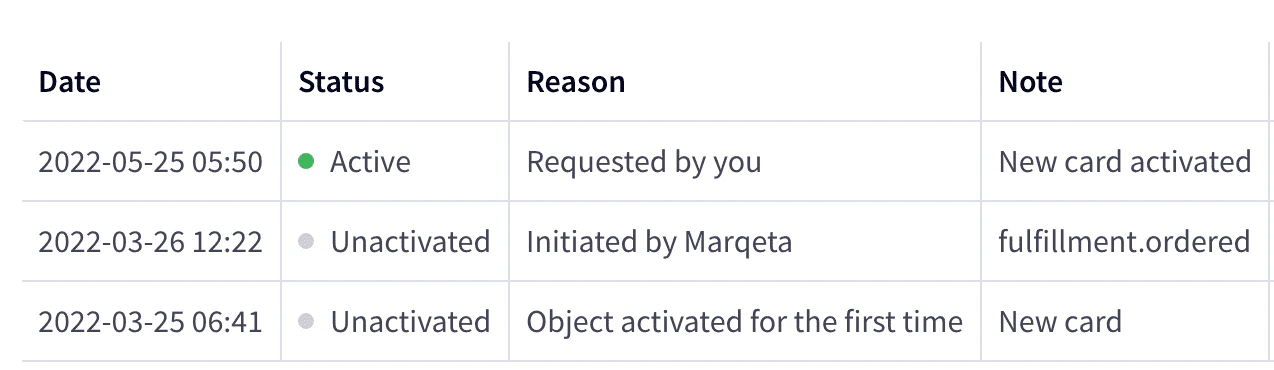
Marqeta works with multiple card providers from which you can order cards. Card orders are sent to each provider daily, taking all non-terminated cards and submitting them to the provider for personalization and shipping to cardholders. After sending the card file, no further changes can be made to the personalization or shipping address of the card. Your Marqeta representative will communicate with you about the correct value of a card product and the file timing for your chosen card provider. For each card that Marqeta transmits to a card provider, Marqeta’s system provides customers with acardtransition webhook with type fulfillment.ordered. This status indicates that the card has left the Marqeta system and is now with the card provider. You can use these webhooks to understand when the card was ordered.
Confirming card status
JSON
fulfillment.ordered transition from when the card was sent to the provider.
Cardholder did not receive their card
-
Check the Marqeta Dashboard to determine when the card was moved to the
fulfillment.orderedstate (i.e., transitioned). If the card has been transitioned, then the card has been shipped from Marqeta to the card provider. - Your card provider received the card token from Marqeta. They can use this token to determine if the card is present in their system, as well as the card’s current status.
- If a card has not been transitioned, confirm that the card was not terminated before the daily card order job was completed. If the card is still unactivated, contact Marqeta for assistance with triaging the issue.
-
If the card provider has determined that a PIN block has not been provided in the file, then the card product could be misconfigured. Ensure that the following elements are set correctly:
-
The card service code should not start with the number
1(for example,101). A card service code beginning with the number1is not configured to support an offline PIN. The service code must match the parameters to which your card network and card provider agreed. -
Ensure that
enable_offline_pinhas been set within your card product, otherwise no offline PIN will be provided to the card provider. This configuration can lead to file rejection.
-
The card service code should not start with the number
Card details are not as expected
- Alpha characters appearing on the card are missing diacritical marks (e.g., å, é, Ł, ü), or names are not truncated as expected.
- The card provider should check the received data and determine if the data were originally provided to them as they appear on the card, or if the data were altered or truncated by the card provider.
- Examine the card API requests to confirm how the card was created, and provide this information to Marqeta for investigation.
Card is non-functional
- If the card is non-functional, it could be the result of a manufacturing issue.
- During the manufacturing process, Marqeta passes an offline PIN to the card provider as a part of the PIN block. If the manufacturer determines that there is an issue with the PIN or the PIN block, then it could indicate a problem with the keys or the Marqeta card product object. If this is the case, contact Marqeta support.
Note
For the card to work immediately, its PIN must be set.
For the card to work immediately, its PIN must be set.
Incorrect display language at ATM or POS
- If an incorrect language is displayed at a POS or ATM, contact your card provider, as these details are part of the chip profile and the card itself is outside of Marqeta.
Authenticating cardholders
The Cardholder Authentication Verification Value (CAVV) for Visa and the Account holder Authentication Value (AVV) for Mastercard provide additional details about the authentication of an e-commerce transaction, along with information about any 3DS authentication. Marqeta addscardholder_authentication_data, as well as data from the card network into these fields. Note that the level of information can vary, depending on the card network, because some card networks provide more information than others.
Authentication and authorization are two separate flows, and both actions are not always provided. It is important to determine how the authentication process impacts the authorization process.
3DS authentication completed, authorization not submitted
In this case, 3DS authentication was completed but no authorization has come through, or has not yet been submitted, which can happen with merchants such as online food delivery services. It is not uncommon for authorizations to be put through several days later, for example, for the delivery date of the order. In this use case, a delay between authentication and authorization is possible.3DS authentication failed, authorization submitted
In this case, 3DS authentication has failed, but the merchant may still decide to push an authorization through regardless. There is an authorization attempt with an exemption out of scope of LVP, or there is an unauthenticated transaction that Marqeta will either approve or soft-decline if LVP rules are configured or exceeded.No 3DS authentication submitted, authorization submitted (no authentication)
This type of transaction is considered to be unauthenticated; however, such activity is allowed up to a specific limit. All unauthenticated and non-exempt transactions are subject to LVP rules. See the Managing SCA in Europe guide for further details.No 3DS authentication submitted, authorization submitted (exempt)
Merchants can choose to exempt an authorization from 3DS authentication. Marqeta currently allows merchants to do this, and supports this course of action under certain circumstances. If the merchant provides any of the following exemptions, Marqeta will bypass the LVP checks and allow the transaction:- Low-Value PSD2 (LVP)
- Acquirer Transaction Risk Analysis (TRA)
- Recurring payments
- Merchant-Initiated Transaction (MIT)
- Secure Corporate Exemption
sca_tra_exemption_amount_limit field of the strong_customer_authentication_limits object in the card product.
Marqeta provides 3DS webhooks that give further insight into the 3DS flow. Webhooks allow you to see when 3DS checks have been initiated or completed and authorization has not been continued. Ask your Marqeta representative to enable this feature for you, then subscribe to the events using a normal webhook configuration.