

accounts resource. For the complete endpoint reference, see Credit Accounts.
At the end of this guide, you should understand:
- How an account is associated with other resources on Marqeta’s credit platform.
- How an account is originated.
- The lifecycle of an account and what each status represents.
- The account factors that affect how much a cardholder can spend.
- The
configandusagesobjects. - Account management and servicing features, such as journal entries, statements, payments, disputes, and more.
Associated resources
Credit accounts are associated with the following resources on Marqeta’s credit platform. For a summary of all credit resources and how they relate to each other, see Summary of Credit Resources.
For account management resources such as transitions, cards, journal entries, and rewards, see Account management features in this guide.
For account servicing features such as statements, payments, delinquency, adjustments, disputes, and balance refunds, see Account servicing features in this guide.
Deprecation of credit products
This guide refers to the credit products feature, which is being deprecated and replaced by credit product policies, which is a part of the bundles feature. For more on policies and bundles in a credit program, see Credit Programs in the Marqeta Dashboard.Relationships rules
The following rules apply to account-card relationships:- A credit account can be accessed by multiple credit cards.
- A credit card can access only one credit account.
- A card can be held by only one user, known as a cardholder.
- A cardholder can hold multiple cards.
- An account can be held by only one user, known as the account holder.
- A user can be the account holder on multiple accounts.
Account origination
Credit accounts are originated when an applicant accepts the terms of their approved application. Prior to that, you, Marqeta, and the issuing bank (the parties involved vary depending on your credit program) perform a series of steps that include offering an account to a prospective account holder, collecting applicant data and acknowledgments of pre-term files, and more. Your credit program must have an active bundle that is created and activated on the Marqeta Dashboard. For more, see Credit Programs in the Marqeta Dashboard. Once your credit program has an active bundle, prospective account holders can apply for a credit account associated with a bundle and receive a decision on their application. If the application is approved and the applicant accepts, Marqeta originates a new credit account on Marqeta’s credit platform.Account origination process
The credit account origination process involves a series of steps that you, Marqeta, and the issuing bank perform using the Applications endpoints on Marqeta’s credit platform.- You offer a credit account based on an associated bundle to a prospective account holder.
- The prospective account holder starts an application on your platform.
- You display pre-terms files on the bundle to the applicant.
- You collect applicant information and file acknowledgments and send them to Marqeta.
- Marqeta sends the application data to the issuing bank.
- The issuing bank renders a decision on the application.
- You display post-terms files to the applicant that vary depending on whether the application is approved or rejected.
- If approved, the applicant accepts or declines the credit account offered.
- If the applicant accepts, Marqeta creates a new credit account on Marqeta’s credit platform with the applicant as the account holder.
The account lifecycle
A credit account can have one of the following statuses.
Payments and rewards are always allowed, regardless of account status. If you want to block rewards and you are a bank, then do not use the
/credit/accounts/{account_token}/rewards endpoint to create an account reward. If you want to block rewards and you are a brand contributor, then deactivate your reward account using the /credit/rewards/accounts/{reward_account_token} endpoint.
Status transitions
The following diagram outlines the possible transitions between account statuses.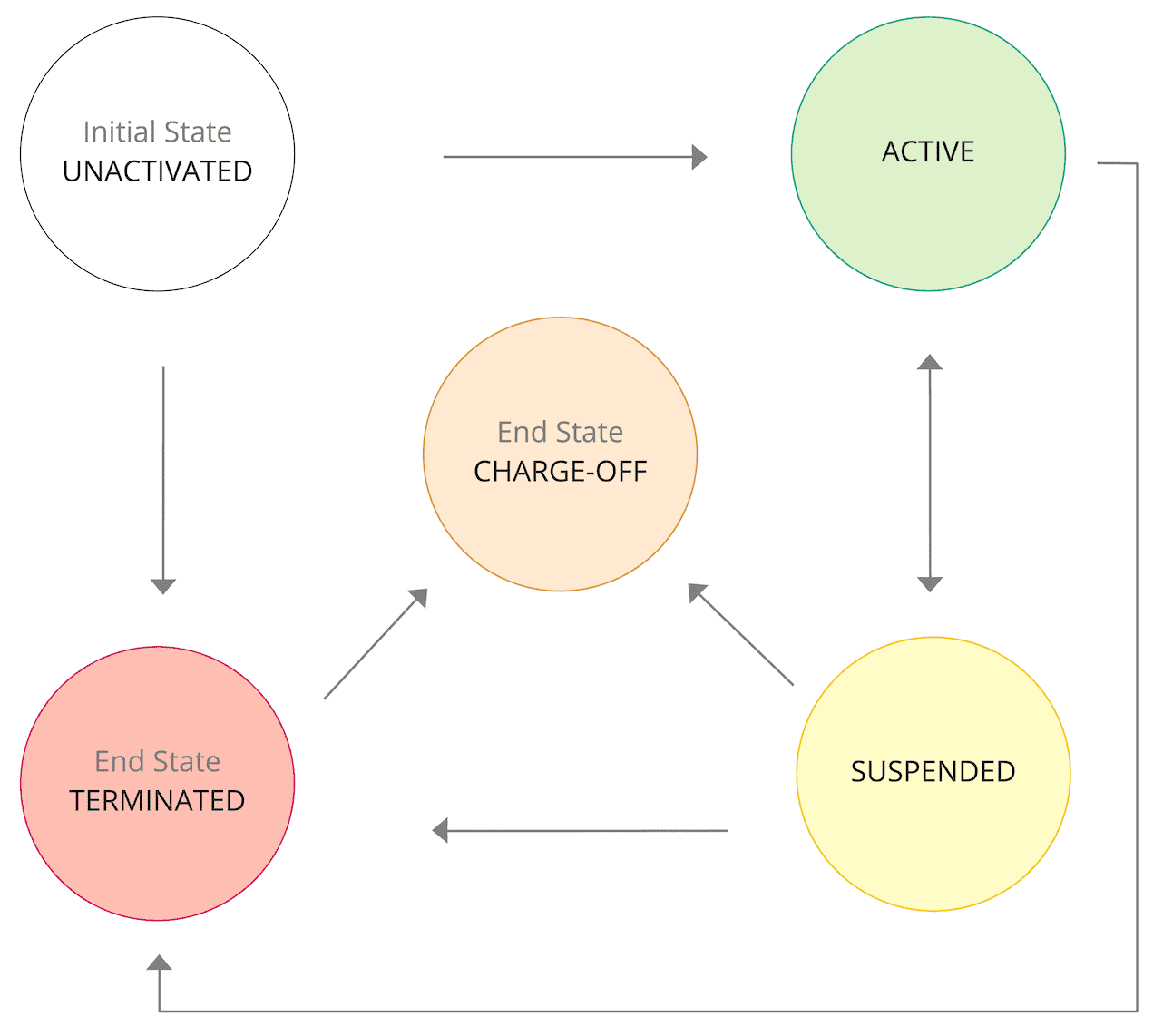
Account substatuses
Use this endpoint to apply and remove a substatus for a credit account. Applying a substatus causes immediate downstream changes to the account. You can apply more than one active substatus to an account at the same time.Note
If you are a Managed by Marqeta customer, please contact your Marqeta representative if you want to apply or remove a substatus from an account.
If you are a Managed by Marqeta customer, please contact your Marqeta representative if you want to apply or remove a substatus from an account.
You can apply one of the following states to a substatus.
Account holder substatuses
Use this endpoint to apply and remove a substatus for a credit account holder or user.Note
If you are a Managed by Marqeta customer, please contact your Marqeta representative if you want to apply or remove a substatus from an account holder.
If you are a Managed by Marqeta customer, please contact your Marqeta representative if you want to apply or remove a substatus from an account holder.
SCRA and DECEASED substatuses can be in one of the following states:
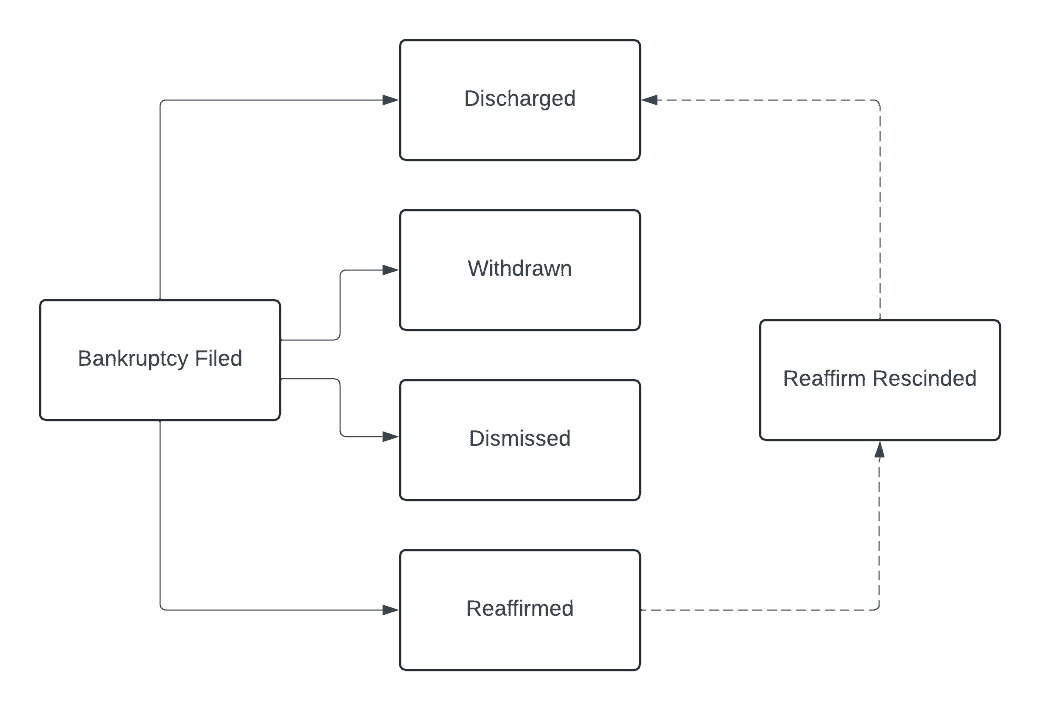
BANKRUPTCY substatuses must follow the sequence of events described in the flow diagram following this table. If the substatus’ latest state is inactivated, then the substatus reverts to its previous state.
Cardholder’s spending power
The purchase balance, available balance, and credit limit determine how much a cardholder can spend.- Purchase balance - The current balance of the credit account.
- Available credit - The amount of credit currently available to use.
- Credit limit - The maximum balance an account can carry.
The config object
In theconfig object, you can configure an account’s billing cycle day, payment due day, fees, fee schedules, and more.
Important days
The values for important days on an account are inherited from the credit product policy in its associated bundle, or its associated credit product (to be deprecated – see more).- The billing cycle day is the day of month a new billing cycle begins. At the end of a billing cycle, you bill the account holder for any unpaid purchases and fees incurred during the billing cycle.
- The payment due day is the day of month that payment for the previous billing cycle is due.
Fees
The fees configured on the policies in the account’s associated bundle, or associated credit product (to be deprecated – see more), can be defined on the account. For example, if a late payment fee is configured on the fee policy in its associated bundle, or associated credit product (to be deprecated – see more), then you can set the amount of the late payment fee on the account.Note
If a fee was not configured on the policies in the account’s associated bundle, or associated credit product (to be deprecated – see more), then it will not be available on the account.
If a fee was not configured on the policies in the account’s associated bundle, or associated credit product (to be deprecated – see more), then it will not be available on the account.
Fee values are defined at the account level and must be a positive amount. There are no other limits on fee values.
Only one penalty fee can be charged per billing cycle. For example, if an account holder makes two payments that bounce in the same billing cycle, only the first returned payment will incur the returned payment fee. If the same account holder then misses a payment in the same billing cycle, an additional late payment fee will not be charged.
You can waive any fee when creating or updating an account by setting the fee value to
0.
Fee schedules
You can configure multiple fee schedules when creating or updating an account by adding multipleschedule objects to the config.fees object. If a fee schedule is in effect and you add a second fee schedule with a future effective_date, the second schedule’s value overrides that of the first when the second schedule’s effective date is reached. This method can be used to set the length of a fee waiver, for example.
You can update a fee schedule by sending a PUT request to the /credit/accounts/{account_token} endpoint.
If you are updating the value of a periodic fee and want the new value to be in effect the next time the fee is charged, the day of new effective_date must be prior to or on the same day that the fee is currently scheduled to be charged. For example, if a scheduled monthly $10 fee is charged on the 10th of every month and on March 9, you update the fee value to $15 effective March 11, the $15 won’t be charged until April 10.
The cut-off time to update a fee schedule is midnight, 00:00 UTC. To ensure a new fee value goes into effect on a chosen date, specify that date as the effective_date before 00:00 UTC on the day prior. For example, if you want a fee to go into effect on April 2, 2024, specify 2024-04-02 as the effective date before 23:59:59 UTC on April 1, 2024.
The usages object
In theusages object, you can define how a credit account is used and the types of balances permitted on the account. (NOTE: Currently, only PURCHASE balance is available.)
Each usage type contains usage-based fees and rewards, such as FX fees, that are linked to the purchase balance.
Account management features
The Marqeta credit platform offers the following resources for account management.Account servicing features
The Marqeta credit platform offers the following resources for account servicing.Tutorial - Originate a credit account
This tutorial walks you through the steps needed to originate a credit account. For the complete account origination process, see Account origination in this guide.Prerequisites
- An active credit bundle - Before you begin, your credit program must have an active bundle that is created and activated on the Marqeta Dashboard.
Step 1 – Display pre-terms to your applicant
Pre-terms are files containing terms and conditions and disclosures that must be displayed to an applicant before their application is submitted. You can retrieve files from the bundle associated with the account being offered. The following files are pre-terms:- e-Disclosure – Acknowledges that the applicant agrees to receive disclosures electronically.
- Privacy Policy – Explains how the information on an application is collected, handled, and processed.
- Rewards Disclosure Pre-terms – Discloses detailed information on the rewards program for the account before the application is submitted.
- Summary of Credit Terms (SOCT) – Outlines the interest rates, interest charges, and fees associated with the account.
1
Send a
GET request to the /credit/applications/files endpoint with the bundle_token included.2
Several files are returned in the response. Display only the pre-terms to the applicant:
E_DISCLOSUREPRIVACY_POLICYREWARDS_DISCLOSURE_PRE_TERMSSOCT
3
In the response, copy the
tracking_token for each file displayed. This token tracks the acknowledgment that the applicant has seen the file.Step 2 – Create an application
After displaying pre-terms to your applicant, collect applicant data and create an application. To create an application, send aPOST request to the /credit/applications endpoint with at least the following fields included:
token– Set the value to the unique identifier of the application.user_token– Set the value to the unique identifier of the applicant.bundle_token– Set the value to the unique identifier of the bundle associated with the application.soct_tracking_token– Paste the tracking token of the SOCT copied from the previous step.privacy_policy_tracking_token– Paste the tracking token of the Privacy Policy copied from the previous step.e_disclosure_tracking_token– Paste the tracking token of the e-Disclosure copied from the previous step.rewards_disclosure_pre_terms_tracking_token– Paste the tracking token of the Rewards Disclosure Pre-terms copied from the previous step.residence_type– Set toOWN,RENT, orOTHER, depending on the applicant’s residence situation.monthly_mortgage_or_rent– Set the value to the monthly amount of the applicant’s mortgage or rent.total_annual_income– Set the value to the total amount of the applicant’s annual income.primary_income_source– Set toEMPLOYED,UNEMPLOYED,SELF_EMPLOYED, orOTHER, depending on the applicant’s primary income source.any_non_taxable_income– Set totrueorfalse, depending on if the applicant has a non-taxable income source.
CREATED state. As the application transitions into other states, Marqeta sends webhook notifications containing application data. If a decision on the application has been rendered, the decision_model object contains the data that influenced the decision. For more on the event types that trigger a notification, see Credit application transition events. For more on webhooks, see About Webhooks.
You can retrieve application data at any time by sending a GET request to the /credit/applications/{application_token} endpoint. For more, see Retrieve application.
A credit account is originated when the applicant accepts an approved application, which transitions the application state from APPROVED to ACCEPTED.
Tutorial - Create a credit account
Note
This tutorial guides you through the process of onboarding a credit account if you are creating a credit account from a credit product (to be deprecated – see more). In all other cases, credit accounts are originated after completing the application process.
This tutorial guides you through the process of onboarding a credit account if you are creating a credit account from a credit product (to be deprecated – see more). In all other cases, credit accounts are originated after completing the application process.
Step one: Obtain a user token
Obtain an existing user token by sending aGET request to /users. For details, see the Users API reference.
Step two: Create a credit account
Create the credit account and customize its attributes and behaviors. Send aPOST request to the /credit/accounts endpoint with at least the following fields included:
token— Set the value to a unique identifier of the account.name— Set the value to the name of the account.bundle_token- Set to the value of the associated bundle. ORcredit_product_token(to be deprecated – see more) andexternal_offer_id— Set to the value of the associated credit product token and external offer id.account_holder_token— Set to the value of the associated account holder’s token.credit_limit— Set to the value of the maximum balance the account can carry.- The
configobject — Include the following fields:billing_cycle_day— Set to the value of1.payment_due_day— Set to the value of31.- The
feesarray — For eachfeesobject, include the following fields:type— Set the value to the fee type, eitherLATE_PAYMENT_FEE,RETURNED_PAYMENT_FEE,ANNUAL_FEE, orMONTHLY_FEE.- The
schedulearray — For eachscheduleobject, include the following fields:method— Set the value toFLAT.value— Set the value to the fee amount.
- The
usagesarray — For eachusagesobject, include the following fields:type— Set the value toPURCHASE.- The
aprsarray — For eachaprsobject, include the following fields:type— Set to the value ofGO_TO.- The
schedulearray — For eachscheduleobject, set thevaluefield to the APR value,1-100.
POST request:
JSON
Step three: Create a credit card
Create a credit card to use to make purchases using the account’s available balance. Send aPOST request to the /credit/accounts/{account_token}/cards endpoint with at least the following fields included:
token— Set the value to a unique identifier of the credit card.card_product_token— Set to the value of the associated card product’s token.user_token— Set to thetokenvalue of the user defined in step one.
POST request:
JSON
Step four: Update a credit account (Optional)
You can update an account’s fees and APRs’ type and schedule. You can use schedules to update usage APRs and config fees. You must pass theeffective_date, which can be either back-dated or future-dated. Each update to schedules replaces a prior schedule in effect on the credit account.
Send a PUT request to the /credit/accounts/{token} endpoint with the fields you want to change in the config object or usages objects set to the values you want. You can change the following fields:
config.fees.typeconfig.fees.schedule.methodconfig.fees.schedule.valueconfig.fees.schedule.effective_date
usages.typeusages.aprs.typeusages.aprs.schedule.valueusages.aprs.schedule.effective_date
PUT request:
JSON
Step five: Update account status (Optional)
Send aPOST request to the credit/accounts/{account_token}/accounttransitions endpoint with the status field set to ACTIVE, SUSPENDED, TERMINATED, or CHARGE_OFF. For more on account statuses, see Status earlier on this page.