

Warning
This page is currently deprecated and the functionality it describes will soon be unavailable. To learn more, contact your Marqeta representative.
This page is currently deprecated and the functionality it describes will soon be unavailable. To learn more, contact your Marqeta representative.
- Create new and manage credit products.
- View all configured credit products and relevant information.
- View the credit product’s history of transitions, which is displayed as a log of comments left by the creator and approver to capture changes
The basics
To manage credit programs, log into the Marqeta Dashboard, select Dashboard in the upper-left corner, and then select Credit products from the sidebar. For more on accessing the Marqeta Dashboard, see Access the Marqeta Dashboard.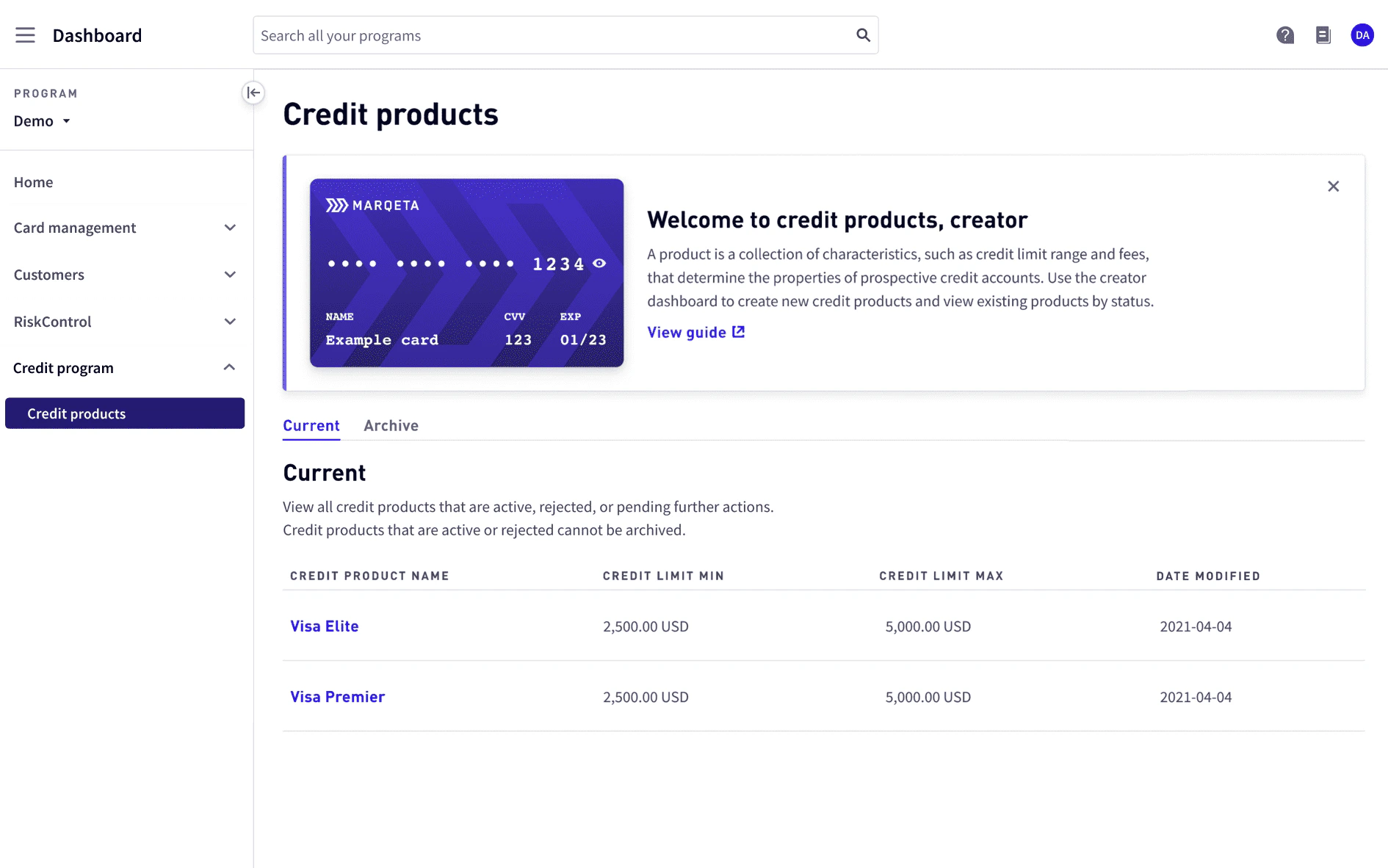
How to…
- View a list of credit products
- View the details of a specific credit product
- Create a credit product (creators only)
- Edit a credit product (creators only)
- Approve, reject, or send a credit product back for revision (approvers only)
- Archive a credit product
- Restore an archived credit product
Admin-assigned roles
Marqeta Dashboard users with an admin role can assign roles to other users. For details on how to manage users, see User management. The following table shows the roles and permissions available for credit products.Approval queue
The following applies if your role iscreator or approver.
Approval queue allows creators and approvers to view a list of credit products that are in review or revision.
Each line item displays:
- Credit product name.
- Credit product status. For more on statuses, see Credit product statuses below.
- Date and time the credit product was submitted for review or revision.
Credit products
Credit products allow you to manage and explore credit products. A credit product is a collection of characteristics, such as the credit line range, fees, or interest, that determine the behaviors and attributes of its associated credit accounts.Credit product statuses
A credit product can have one of the following statuses.Viewing a list of credit products
To view a list of all credit products, go to Credit Programs > Credit products. A welcome banner is displayed at the top. To hide the welcome banner, select x from the top-right corner. You can view a list of current or archived credit products.Viewing credit product details
To display the credit product details, select the credit product name from the list of credit products. The credit product name is displayed at the top along with its status, token, and the date and time it was last modified. To view the credit product’s token history, select Full token history.Credit product token history
The Credit product token history allows you to view a table of the credit product’s full token history. Each line item displays:- Credit product token.
- Token status.
- Active – Token currently used by the credit product.
- Inactive – Token that was previously used by the credit product, but has since been replaced.
- Date and time the token was created.
Global configurations – Core constructs
Global configurations – Payments
Usage configurations – Purchases
Usage configurations – Interest calculation
Activity
The Activity log shows the history of activity on the credit product displayed as a log of comments left by the creator and approver to capture changes. Each comment includes the credit product status at the time of comment, the commenter’s email, the time the comment was left, and the comment itself.The credit product workflow
1
The creator starts creating a new credit product.
2
The creator specifies global and usage configurations.
3
The creator reviews the credit product, adds a note, and submits it for approval.
(Note: You can save a credit product as a draft instead of submitting for approval. Credit products in draft status do not appear in the Activity log.)
(Note: You can save a credit product as a draft instead of submitting for approval. Credit products in draft status do not appear in the Activity log.)
4
The approver adds a note and approves, rejects, or sends the credit product back to the creator for revision.
5
If sent for revision, the creator revises the credit product, adds a note, and resubmits it for approval.
6
If approved, the new credit product is active and can be used to create credit accounts.
Credit product tutorials
The following tutorials walk you through how to manage credit products based on your role.Creating a credit product
The following applies if your role iscreator.
To create a credit product, select Create credit product from Credit Programs > Credit products.
The fields defined on Create credit product determine the attributes of its associated credit accounts.
Note
Currently, some fields have default values that can be configured in the future.
Currently, some fields have default values that can be configured in the future.
Step one. Specify global configurations
1
Select card products to associate with the credit product. For more on card products, see Managing Cards in the Marqeta Dashboard.
2
Enter a name and description for the credit product.
3
Review the credit product classification, type, subtype, and currency type.
4
Define the credit limit minimum and maximum amounts.
5
Review the billing cycle day, payment due day, and balance usage.
6
Define the minimum payment percentage and amount.
7
Select Continue.
Step two. Specify usage configurations
1
Select the fee types to apply to purchases when creating credit accounts based on this credit product.If selecting a periodic fee:
- Select the frequency, monthly or annual, to apply the fee.
- Enter the number of days after the account activation date to charge the initial fee.
- If the frequency is monthly, the fee charge recurs on the same day each month. If the day is not applicable, such as day 31, the fee charge occurs on the last day of that month.
- If the frequency is annual, the fee charge recurs on the same date each year. If the date is not applicable, such as in a leap year, the fee charge occurs on the last day of the month in that year.
Note
You can only set one monthly fee and one annual fee.
2
Review the APR, rewards, and interest calculation fields.
3
Select Continue.
Step three. Review and submit
1
Review all the fields for the credit product.
2
Enter a note to the approver that also appears in the Activity log.
3
Select Submit to send the credit product to the approver for review or Save as draft to save the credit product as a draft.
Editing a credit product
The following applies if your role iscreator.
You can edit a credit product in one of the following statuses: active, draft, sent for revision.
- To edit an active credit product, select the credit product name from Credit Programs > Credit products, and then select Update credit product on the top-right of the page. The Update credit product page appears.
- To edit a credit product in draft, select the credit product name from Credit Programs > Credit products. The Edit credit product draft appears.
- To edit a credit product sent for revision, select the credit product name from Credit Programs > Approval queue. The Revise credit product page appears.
Step one. Update global configurations
1
Select, deselect, or enter new values for the fields to update. The following fields can be updated:
- Card product
- Credit product name
- Credit product description
- Card products
- Credit product classification
- Credit limit minimum and maximum
- Minimum payment percentage
- Minimum payment amount
2
Select Continue.
Step two. Update usage configurations
1
If your credit product is in draft, select or deselect fees and toggle rewards.If your credit product is active or sent for revision, select and enter a new periodic fee.You cannot edit or remove an existing fee.
2
Select Continue.
Step three. Review and submit
1
Review all the updated fields for the credit product.
2
Enter a note to the approver that also appears in the Activity log.
3
To submit the credit product to the approver for review, select Submit.
Approving, rejecting, or sending a credit product back for revision
The following applies if your role isapprover.
To make a decision about a credit product pending approval, select the credit product from Credit Programs > Approval queue.
On Review credit product, you can view the creator’s comments in the Activity log at the bottom.
1
Review the fields for the credit product.
2
Enter a note to the creator that also appears in the Activity log.
3
To approve of the credit product, select Approve.
4
To send the credit product back for revision, select Send back for revision.
5
To reject the credit product, select the More dropdown, and then select Reject.
Archiving a credit product
Note
You cannot archive an
You cannot archive an
active credit product.Step one. View global configurations
- Select Continue.
Step two. View usage configurations
- Select Continue.
Step three. View review and submit
1
Enter a note to appear in the Activity log.
2
To archive the credit product, select Archive. The credit product now appears in the Archive tab.
Restoring an archived credit product
To restore an archived credit product, select the credit product name on the Archive tab from Credit Programs > Credit products.1
Scroll to the bottom and enter a Note to appear in the Activity log.
2
Select Restore as draft. Edit credit product is displayed.
3
Continue the steps for Editing a credit product.